Loading
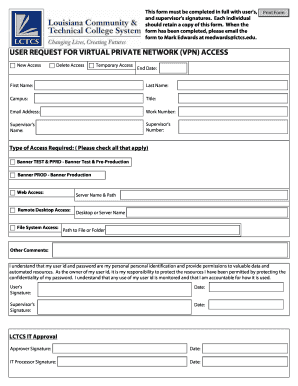
Get This Form Must Be Completed In Full With User's,
How it works
-

Open form follow the instructions
-

Easily sign the form with your finger
-

Send filled & signed form or save
How to fill out the This Form Must Be Completed In Full With User's, online
Completing the This Form Must Be Completed In Full With User's online is a straightforward process that requires your attention to detail. This guide will walk you through each section of the form, ensuring you provide all necessary information accurately.
Follow the steps to complete the form online.
- Click ‘Get Form’ button to obtain the form and open it in the editor.
- Begin by providing your first name and last name in the designated fields. Make sure to input your full legal name as it appears on official documents.
- Next, indicate your campus by selecting it from the provided list. This helps to route your request correctly within the organization.
- Fill in your title, which should reflect your current role or position within the organization. This is important for understanding your access needs.
- Enter your email address and work number accurately, as this information will be used for communication and verification purposes.
- Provide your supervisor's name and their number, ensuring that these are up-to-date and correct for approval processes.
- Select the type of access required by checking all applicable boxes. This section includes options for Banner TEST & PPRD, Banner PROD, Web Access, Remote Desktop Access, and File System Access.
- For Web Access, be sure to detail the server name and path. If you are requesting Remote Desktop Access, specify the desktop or server name and the path to the file or folder needed.
- Use the comments section to provide any additional information or context that may help in processing your request.
- Read the user responsibility statement carefully. Acknowledge your understanding by providing your signature and the date in the specified field.
- Obtain your supervisor's signature and date in the appropriate areas, which will authorize your request.
- Lastly, make sure to save changes, download, print, or share the completed form as needed. Adhere to any submission instructions provided, including emailing the form to Mark Edwards.
Complete your forms online now to ensure timely processing of your requests.
I-9 forms are given to new hires in the United States. It is given to both US citizens and non-citizens who have a temporary or permanent work visa. You can expect the following timeline when filling out an I-9 form: An employee receives a job offer and accepts.