Loading
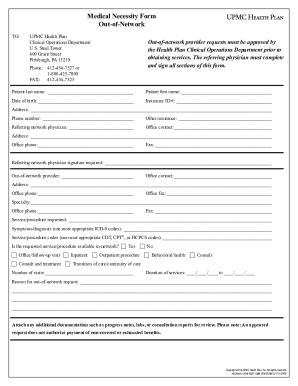
Get Medical Necessity Form Outofnetwork To: Upmc Health Plan Clinical Operations Department U
How it works
-

Open form follow the instructions
-

Easily sign the form with your finger
-

Send filled & signed form or save
How to fill out the Medical Necessity Form OutofNetwork TO: UPMC Health Plan Clinical Operations Department U online
Filling out the Medical Necessity Form OutofNetwork is essential for obtaining approval for out-of-network services from UPMC Health Plan. This guide provides step-by-step instructions to ensure a complete and accurate submission.
Follow the steps to successfully complete the form.
- Press the ‘Get Form’ button to access the Medical Necessity Form OutofNetwork and open it for editing.
- Begin filling out the patient details. Enter the patient's last name, first name, and date of birth in the designated fields.
- Input the patient's insurance ID number and address, along with their phone number.
- Provide information on other insurance if applicable, including the name of the referring network physician and their office contact.
- Complete the referring network physician's address and phone number, and obtain their signature in the required section.
- Fill in the out-of-network provider’s details, including their office contact, address, phone number, and fax number.
- Specify the provider's specialty and indicate the service or procedure requested, including details about symptoms or diagnosis (ICD-9 codes) in the respective fields.
- List the service or procedure codes (CDT, CPT®, or HCPCS) that apply to the request.
- Indicate whether the requested service or procedure is available in-network by selecting 'Yes' or 'No.'
- Mark the appropriate type of service being requested—choose from options such as office visit, inpatient, outpatient procedure, behavioral health, or consult.
- Specify the number of visits required and the duration of services by filling in the relevant date fields.
- Clearly state the reason for the out-of-network request in the provided section.
- Attach any additional documentation needed for review, such as progress notes and lab results.
- After completing all sections, review all entries for accuracy. Save changes, and you can then download, print, or share the completed form.
Complete your Medical Necessity Form OutofNetwork online today for a smoother approval process.
All claims must be filed within one year of the date of service.
Industry-leading security and compliance
US Legal Forms protects your data by complying with industry-specific security standards.
-
In businnes since 199725+ years providing professional legal documents.
-
Accredited businessGuarantees that a business meets BBB accreditation standards in the US and Canada.
-
Secured by BraintreeValidated Level 1 PCI DSS compliant payment gateway that accepts most major credit and debit card brands from across the globe.