Loading
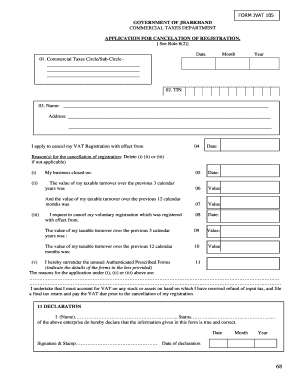
Get Application For Cancellation For Registration Certificate - Rushabh ...
How it works
-

Open form follow the instructions
-

Easily sign the form with your finger
-

Send filled & signed form or save
How to fill out the Application For Cancellation For Registration Certificate - Rushabh online
This guide is designed to assist users in completing the Application For Cancellation For Registration Certificate - Rushabh online. By following these steps, users can ensure a smooth process while providing all necessary information accurately.
Follow the steps to fill out the Application For Cancellation For Registration Certificate - Rushabh.
- Click ‘Get Form’ button to obtain the form and open it in the editor.
- In Box 01, indicate the name of the Commercial Taxes Circle or Sub-Circle as listed in your official documents.
- In Box 02, insert your Tax Identification Number (TIN), which you can find on your VAT Certificate of Registration.
- In Box 03, provide your name and address exactly as shown on your VAT Certificate of Registration.
- In Box 04, enter the date from which you wish to request the cancellation of your registration.
- For Box 05, indicate the date on which your business closed.
- In Box 06, provide the total value of your taxable sales (excluding VAT) for the last three consecutive calendar months.
- In Box 07, enter the value of your taxable sales (excluding VAT) for the previous twelve consecutive calendar months.
- If applicable, in Box 08, insert the date from which you were voluntarily registered.
- For Box 09, provide the value of your taxable sales (excluding VAT) for the previous three consecutive calendar months if you were voluntarily registered.
- In Box 10, enter the taxable sales (excluding VAT) for the previous twelve consecutive calendar months if you were voluntarily registered.
- In Box 11, insert your name and title as the person making the declaration, and remember to sign and date the declaration.
- Once all fields are filled out accurately, review your information for any errors. You can save changes, download, print, or share the form as needed.
Complete your application online for a smooth cancellation process.
Here are the best AI logo generators we recommend: Logomaster. Free Logo Design. Logo AI. Looka logo maker (formerly known Logojoy) Brandmark. DesignEvo. Tailor Brands. Designhill.