Loading
Get Logysystem
How it works
-

Open form follow the instructions
-

Easily sign the form with your finger
-

Send filled & signed form or save
How to fill out the Logysystem online
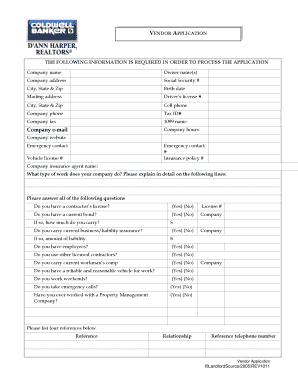
This guide provides clear instructions on how to complete the Logysystem vendor application online. By following these steps, you will ensure that all necessary information is accurately submitted for processing.
Follow the steps to fill out the Logysystem vendor application effectively.
- Press the ‘Get Form’ button to access the vendor application and load it into your online editor.
- Begin by entering your company's name in the designated field.
- Provide the owner's name or names as required.
- Input the company address, including the street, city, state, and zip code.
- Enter your Social Security number in the specified section.
- Fill in your birth date accurately.
- If different from the company address, include your mailing address.
- Input your driver’s license number in the appropriate field.
- Provide your cell phone number for contact purposes.
- Enter the company phone number.
- Input your Tax Identification Number (Tax ID#).
- Fill in the company fax number where applicable.
- Provide the name you will use for 1099 purposes.
- Enter your company e-mail address.
- Specify your company hours of operation.
- Provide your company website's URL.
- List an emergency contact name and their phone number.
- Provide the insurance policy number.
- Enter the vehicle license plate number.
- Fill in the name of your company insurance agent.
- Describe the type of work your company does in the provided text area.
- Answer the questions regarding licensing, bonding, insurance, and other operational queries as yes or no and provide necessary details.
- List four references, including their names, relationships, and telephone numbers.
- Affix your signature in the designated area to affirm the truthfulness of the information provided.
- Finally, set the date for your application submission and ensure all information is complete.
- You can now save changes, download, print, or share the completed application as required.
Complete your vendor application online today to streamline your submission process.
Industry-leading security and compliance
US Legal Forms protects your data by complying with industry-specific security standards.
-
In businnes since 199725+ years providing professional legal documents.
-
Accredited businessGuarantees that a business meets BBB accreditation standards in the US and Canada.
-
Secured by BraintreeValidated Level 1 PCI DSS compliant payment gateway that accepts most major credit and debit card brands from across the globe.