Loading
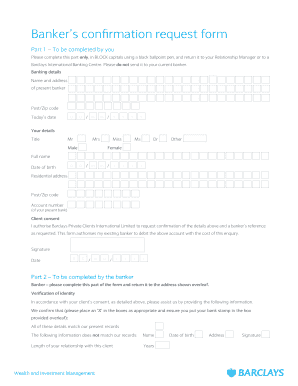
Get Bank Verification Letter Format Pdf
How it works
-

Open form follow the instructions
-

Easily sign the form with your finger
-

Send filled & signed form or save
How to fill out the Bank Verification Letter Format Pdf online
This guide provides a comprehensive walkthrough for filling out the Bank Verification Letter Format Pdf online. Whether you are familiar with banking forms or new to the process, this instructions will help you complete the required fields accurately and efficiently.
Follow the steps to successfully complete your Bank Verification Letter Format Pdf
- Click ‘Get Form’ button to obtain the form and open it in the editor.
- Begin by filling out the banking details section. Input the name and address of your present banker, along with the postal code and today's date.
- Proceed to enter your details. In this section, complete your title, full name, and date of birth using the format provided.
- Next, provide your residential address and postal code. Ensure all information is accurate to avoid processing delays.
- Input your account number from your present bank. This is essential for verifying your banking information.
- Read the client consent statement carefully. You must authorize Barclays Private Clients International Limited to request confirmation of your banking details. Ensure you sign and date this section.
- Once all parts are completed, review the form for any errors or missing information. Make sure every section is filled out correctly.
- Finally, save your changes, download the completed form, and print it if necessary. You may also choose to share it directly with your Relationship Manager or appropriate banking center.
Fill out your Bank Verification Letter Format Pdf online to ensure a smooth banking experience.
How to download a bank verification letter Navigate to the Accounts tab. Select the checking account for which you want a bank verification letter. Select the Three Vertical Dots beside the Add Money button. Select Request Bank Verification Letter from the dropdown menu.