Loading
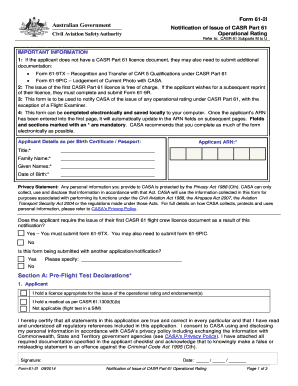
Get 61 2i
How it works
-

Open form follow the instructions
-

Easily sign the form with your finger
-

Send filled & signed form or save
How to fill out the 61 2i online
This guide will assist users in filling out the 61 2i form electronically. Whether you are applying for your first CASR Part 61 licence or updating your operational rating, following these steps will ensure a smooth and efficient process.
Follow the steps to complete the 61 2i form online.
- Click the ‘Get Form’ button to access the 61 2i form and open it in your preferred editor.
- Begin filling out the applicant details section. Provide information as it appears on the applicant's birth certificate or passport, including title, family name, given names, date of birth, and applicant ARN. Remember that fields marked with an asterisk (*) are mandatory.
- Respond to the question regarding whether the applicant requires the issuance of their first CASR Part 61 flight crew licence. If 'Yes', you will need to submit additional forms 61-9TX and possibly 61-9PIC.
- In Section A, complete the pre-flight test declarations. Each applicant must certify that they hold the appropriate licence and medical qualifications. Ensure to sign and date this section.
- Continue to Section B, where you will specify the operational ratings issued. Tick the relevant boxes and list any endorsements using the correct abbreviations.
- Indicate the category of aircraft or class/type used for the flight test. Complete the necessary fields, including the aircraft make/model and registration number or the simulator ID number.
- In Section C, the flight examiner must complete the declaration, confirming that the applicant meets all requirements. The flight examiner must also sign and date this section.
- Once all information is complete, save your changes. You may then download, print, or share the completed form as required to submit to CASA.
Start completing your document online today to stay on track with your aviation qualifications.
Creating a digital signature is easy Upload your document into the electronic signature application, such as our eSignature application. Drag in the signature, text and date fields where the recipient needs to take action. Click send.