Loading
Get Kolkatapistel Form
How it works
-

Open form follow the instructions
-

Easily sign the form with your finger
-

Send filled & signed form or save
How to fill out the Kolkatapistel Form online
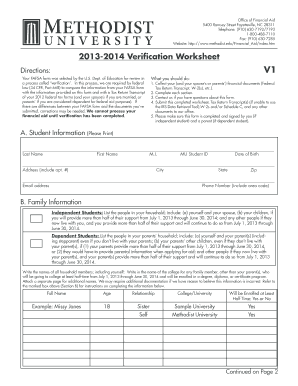
This guide provides clear, step-by-step instructions for filling out the Kolkatapistel Form online. Whether you have prior experience or are new to digital document management, this guide will help you navigate through each section with ease.
Follow the steps to complete the Kolkatapistel Form successfully.
- Click ‘Get Form’ button to access the Kolkatapistel Form and open it in your preferred editor.
- Begin with providing your personal information. Fill out your last name, first name, middle initial, and your student ID number. Make sure to include your date of birth accurately.
- Next, complete your address section, including the apartment number, city, state, and zip code. Ensure that your contact details, such as email address and phone number, are correctly entered.
- Proceed to the Family Information section. Depending on your student status (independent or dependent), list all individuals living in your household, along with their respective ages, relationships to you, and the colleges they will attend, if applicable.
- Gather your financial documents. You will need your tax return transcripts and any W-2 forms. If you utilize the IRS Data Retrieval Tool, you'll be transferring your tax information directly; otherwise, obtain the transcripts directly from the IRS.
- Fill in the Tax Return Transcript and Income Information section accurately. This involves reporting both the income of tax filers and non-tax filers, as well as any untaxed income, by referring to your financial documents.
- If applicable, check the boxes for any benefits received from programs like SNAP, and provide details regarding child support paid, including relevant names and total amounts.
- Complete the Additional Financial Information section. Report any untaxed income and sources of taxable income as instructed, ensuring to enter 'NA' where required.
- Finally, you and a parent (if you're a dependent student) must sign and date the certification statement. Before submission, double-check all provided information for accuracy.
- Once you have completed and signed the form, save your changes, and utilize the options available to download, print, or share the Kolkatapistel Form as needed.
Start filling out your Kolkatapistel Form online today to ensure your financial aid processing!
By default, the android CheckBox will be in the OFF (Unchecked) state. We can change the default state of CheckBox by using android:checked attribute. In case, if we want to change the state of CheckBox to ON (Checked), then we need to set android:checked = “true” in our XML layout file.