Loading
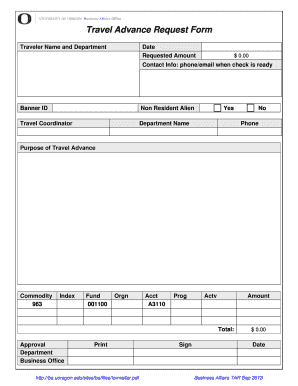
Get Travel Advance Request Form - Business Affairs - Ba Uoregon
How it works
-

Open form follow the instructions
-

Easily sign the form with your finger
-

Send filled & signed form or save
How to fill out the Travel Advance Request Form - Business Affairs - Ba Uoregon online
This guide provides a clear and comprehensive overview of how to fill out the Travel Advance Request Form for Business Affairs at Ba Uoregon online. By following these instructions, users can efficiently complete the form and ensure all required information is submitted accurately.
Follow the steps to complete your Travel Advance Request Form online.
- Click ‘Get Form’ button to obtain the form and open it in the editor.
- Enter the traveler's name and department in the designated fields. Ensure that the information provided is accurate and current.
- Fill in the date of the request in the appropriate field.
- Specify the requested amount for the travel advance in the designated monetary field. The default may appear as $0.00, so ensure to adjust it accordingly.
- Provide your contact information, including a phone number and email address, for communication regarding when the check is ready.
- Input your Banner ID if applicable. This helps in identifying your travel records.
- Indicate whether the traveler is a non-resident alien by selecting 'Yes' or 'No'.
- Fill out the name of the travel coordinator. This is typically the person responsible for managing the travel plans.
- Complete the department name field to specify the relevant department associated with the travel request.
- In the 'Purpose of Travel Advance' section, provide a clear explanation of the travel purpose.
- Fill in the commodity code, index, fund, organization, account, program, and activity fields as necessary. This information may vary depending on the specifics of the request.
- Ensure that the total amount to be requested reflects accurately at the bottom of the form.
- Seek approval from the department by having the necessary signatures in the approval section.
- Finally, review the entire form for accuracy. Once complete, you can save changes, download, print, or share the form as needed.
Complete your Travel Advance Request Form online today for a smooth and efficient experience.
The <footer> tag in HTML is used to define a footer of HTML document. This section contains the footer information (author information, copyright information, carriers, etc).
Industry-leading security and compliance
US Legal Forms protects your data by complying with industry-specific security standards.
-
In businnes since 199725+ years providing professional legal documents.
-
Accredited businessGuarantees that a business meets BBB accreditation standards in the US and Canada.
-
Secured by BraintreeValidated Level 1 PCI DSS compliant payment gateway that accepts most major credit and debit card brands from across the globe.