Loading
Form preview
  • US Legal Forms
  • Form Library
  • More Forms
  • More Uncategorized Forms
  • Sfdehxxgds Form

Get Sfdehxxgds Form

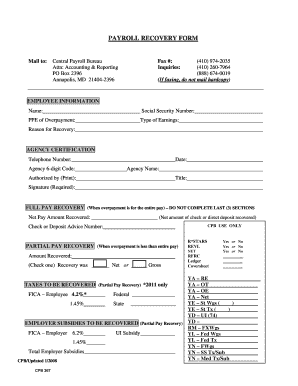
PAYROLL RECOVERY FORM Mail to: Central Payroll Bureau Attn: Accounting & Reporting PO Box 2396 Annapolis, MD 21404-2396 (410) 974-2035 (410) 260-7964 (888) 674-0019 (If faxing, do not mail hardcopy).

How it works

  1. Open form

    Open form follow the instructions

  2. Easily sign form

    Easily sign the form with your finger

  3. Share form

    Send filled & signed form or save

How to fill out the Sfdehxxgds Form online

Filling out the Sfdehxxgds Form online can be a straightforward process if you follow the right steps. This guide will help you navigate the form's sections and fields, ensuring that you provide all the necessary information accurately.

Follow the steps to fill out the Sfdehxxgds Form with ease.

  1. Click the ‘Get Form’ button to obtain the form and open it in the editor.
  2. Enter your employee information. This includes your full name, Social Security Number, pay period ending date of overpayment, type of earnings, and the reason for recovery. Make sure this information is accurate to avoid processing delays.
  3. Next, move to the 'Agency Certification' section. Here, you must provide the agency’s 6-digit code, telephone number, agency name, and title. Specify the date, and ensure that the authorized person prints their name and provides a signature where required.
  4. If your recovery is a full pay recovery, fill in the net pay amount recovered. If it applies to partial pay recovery, provide the required amount recovered and check whether the recovery is based on net or gross pay.
  5. Complete the additional sections relevant to taxes to be recovered if applicable. This includes reporting subsidies and any employee or employer tax information required. Make sure to check all options accurately.
  6. Once all information is entered and confirmed as correct, you can save your changes, download the form, print it for mailing, or share it as needed.

Start filling out your documents online today!

Get form

Experience a faster way to fill out and sign forms on the web. Access the most extensive library of templates available.
Get form

Related content

[XLS] seasfac - Census Bureau
Additional information on the general form of the model and the X-13 ARIMA-​SEATS...
Learn more
Hw3-stats-google-1gram - Carnegie Mellon...
... CD 0.000272755810896 item 0.000272031844196 form 0.000271326186960...
Learn more

Related links form

Peace And Good Behaviour Regulation 2010 Form 1219i Employer Nomination Under The Regional Sponsored Migration Scheme Please Read These Notes Carefully Gedragsvragenlijst Form

Questions & Answers

Get answers to your most pressing questions about US Legal Forms API.

Contact support

In HTML, a comment is a section of text that is not processed by the web browser. Comments are enclosed in <!-- --> tags. These tags tell the browser that the text inside them is a comment and should not be rendered on the front end.

An HTML comment begins with <! –– and the comment closes with ––> . HTML comments are visible to anyone that views the page source code, but are not rendered when the HTML document is rendered by a browser.

The first method for adding comment boxes in HTML is to use codes. However, there are many free scripts available on the web. You don't need to worry about writing the code with these scripts. You only need to copy and paste the code; the comments section will display wherever you place the code.

A comment form is a great tool – it allows your readers to interact with your authors and vice versa. Engagement is significant for any website; such a direct line of communication should be fostered with care. In this short article, we'll look at some of the options we have for bending the comment form to our will.

HTML Comments <!-- This is a comment --> <p>This is a paragraph.</ p> <!-- ... <p>This is a paragraph.</ p> <!-- < p>This is another paragraph </p> --> <p>This is a paragraph too.</ ... Hide a section of HTML code: <p>This is a paragraph.</ p> <!-- ... Hide a part of a paragraph: <p>This <!-- great text --> is a paragraph.</ p>

Top ten tips for writing a great comment Read the article. ... Respond to the article. ... Read the other comments. ... Make it clear who you're replying to. ... Use the return key. Avoid sarcasm. Avoid unnecessary acronyms. Use facts.

The WordPress comment form is generated by using the function: <? php comment_form(); ?> . By default, this function generates your comment form with three text fields (Name, Email, and Website), a textarea field for the comment text, a checkbox for GDPR compliance, and the submit button.

Get This Form Now!

Use professional pre-built templates to fill in and sign documents online faster. Get access to thousands of forms.
Get form
If you believe that this page should be taken down, please follow our DMCA take down processhere.
Get Sfdehxxgds Form
Get form
  • Adoption
  • Bankruptcy
  • Contractors
  • Divorce
  • Home Sales
  • Employment
  • Identity Theft
  • Incorporation
  • Landlord Tenant
  • Living Trust
  • Name Change
  • Personal Planning
  • Small Business
  • Wills & Estates
  • Packages A-Z
  • Affidavits
  • Bankruptcy
  • Bill of Sale
  • Corporate - LLC
  • Divorce
  • Employment
  • Identity Theft
  • Internet Technology
  • Landlord Tenant
  • Living Wills
  • Name Change
  • Power of Attorney
  • Real Estate
  • Small Estates
  • Wills
  • All Forms
  • Forms A-Z
  • Form Library
  • Legal Hub
  • About Us
  • Help Portal
  • Legal Resources
  • Blog
  • Affiliates
  • Contact Us
  • Delete My Account
  • Site Map
  • Industries
  • Forms in Spanish
  • Localized Forms
  • State-specific Forms
  • Forms Kit
  • Real Estate Handbook
  • All Guides
  • Notarize
  • Incorporation services
  • For Consumers
  • For Small Business
  • For Attorneys
  • USLegal
  • FormsPass
  • pdfFiller
  • signNow
  • altaFlow
  • DocHub
  • Instapage
Form Packages
  • Adoption
  • Bankruptcy
  • Contractors
  • Divorce
  • Home Sales
  • Employment
  • Identity Theft
  • Incorporation
  • Landlord Tenant
  • Living Trust
  • Name Change
  • Personal Planning
  • Small Business
  • Wills & Estates
  • Packages A-Z
Form Categories
  • Affidavits
  • Bankruptcy
  • Bill of Sale
  • Corporate - LLC
  • Divorce
  • Employment
  • Identity Theft
  • Internet Technology
  • Landlord Tenant
  • Living Wills
  • Name Change
  • Power of Attorney
  • Real Estate
  • Small Estates
  • Wills
  • All Forms
  • Forms A-Z
  • Form Library
Customer Service
  • Legal Hub
  • About Us
  • Help Portal
  • Legal Resources
  • Blog
  • Affiliates
  • Contact Us
  • Delete My Account
  • Site Map
  • Industries
  • Forms in Spanish
  • Localized Forms
  • State-specific Forms
  • Forms Kit
Legal Guides
  • Real Estate Handbook
  • All Guides
Prepared for you
  • Notarize
  • Incorporation services
Our Customers
  • For Consumers
  • For Small Business
  • For Attorneys
Our Sites
  • USLegal
  • FormsPass
  • pdfFiller
  • signNow
  • altaFlow
  • DocHub
  • Instapage
Social Media
Call us now toll free:
+1 833 426 79 33
As seen in:
© Copyright 1999-2026 airSlate Legal Forms, Inc. 3720 Flowood Dr, Flowood, Mississippi 39232
  • Your Privacy Choices
  • Terms of Service
  • Privacy Notice
  • Content Takedown Policy
  • Bug Bounty Program