Loading
Form preview
  • US Legal Forms
  • Other Templates
  • More Forms
  • More Uncategorized Forms
  • Set Up A Direct Debit - Liverpool City Council

Get Set Up A Direct Debit - Liverpool City Council

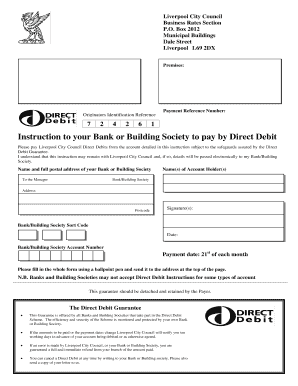
Liverpool City Council Business Rates Section P.O. Box 2012 Municipal Buildings Dale Street Liverpool L69 2DX Premises: Originators Identification Reference 7 2 4 2 6 Payment Reference Number: 1 Instruction.

How it works

  1. Open form

    Open form follow the instructions

  2. Easily sign form

    Easily sign the form with your finger

  3. Share form

    Send filled & signed form or save

How to fill out the Set Up A Direct Debit - Liverpool City Council online

Setting up a direct debit with Liverpool City Council is a straightforward process that enables users to manage their payments efficiently. This guide will provide clear, step-by-step instructions on how to complete the online form, ensuring you have a smooth experience.

Follow the steps to set up your direct debit online.

  1. Click ‘Get Form’ button to obtain the form and open it in the editor.
  2. Fill in the 'Originators Identification Reference' field with the provided reference number. This unique identifier will help link your payments to your account.
  3. Enter your 'Payment Reference Number' as stated in your correspondence with Liverpool City Council. This number assists in identifying your account.
  4. Provide the full name and postal address of your bank or building society. This information is necessary for processing your direct debit.
  5. Complete the 'Name(s) of Account Holder(s)' section with the name(s) of the individual(s) who hold the bank account.
  6. Input the 'Bank/Building Society Sort Code' and 'Bank/Building Society Account Number'. These identifiers are essential for executing the direct debit.
  7. Choose the payment date, which is set to the 21st of each month. Confirm this date aligns with your payment schedule.
  8. Sign the form and include the date of signing. Your signature is a necessary part of this instruction for authorizing the direct debit.
  9. Review the completed form carefully to ensure that all information is accurate and all fields have been filled. Any inaccuracies could delay your direct debit setup.
  10. Once completed, save your changes, then download, print, or share the form as necessary before sending it to the provided address.

Complete your direct debit setup online today for a seamless payment experience.

Get form

Experience a faster way to fill out and sign forms on the web. Access the most extensive library of templates available.
Get form

Related content

Contact My Local Office in New York | Internal...
Get office hours and contact information for local IRS Tax Assistance Centers (TACs) in...
Learn more
[PDF] The Role of museums and the arts in the...
the Maritime Museum, make of Liverpool the second museum capital of England. Moreover, as...
Learn more
Portal:Current events/February 2016 - Wikipedia
The Government of Honduras declares a state of emergency with 3,649 suspected ... The...
Learn more

Related links form

Thesis Statements And Key Terms - Riverside Community College Corporate Social Responsibility Award Form - The Chartered ... Application Of Fao Vca Software Form Substitute Form W-8 - IEEE Computer Society - Computer

Questions & Answers

Get answers to your most pressing questions about US Legal Forms API.

Contact support

Use this form to set up a Direct Debit to pay your Council Tax each month. You can also change the bank details or date of payment for a Direct Debit you've already set up. You'll need: your Council Tax account number, which you can find on your Council Tax bill.

A Direct Debit is set up by the company you're paying, so you can't set them up yourself or amend them online. ... If you do want to amend a Direct Debit, perhaps by changing the amount or the date you want to pay, you'll need to contact the company that takes your payments.

Once you're set up to pay by direct debit, you don't need to cancel it before you receive your next bill. Your direct debit will automatically change in line with any changes to your bill.

To change your direct debit details just set up a new direct debit. The new one will automatically replace the old one, so you won't get two bills.

Use this form to set up a Direct Debit to pay your Council Tax each month. You can also change the bank details or date of payment for a Direct Debit you've already set up. You'll need: your Council Tax account number, which you can find on your Council Tax bill.

You can set up a Direct Debit for your Council Tax payment online or by telephone.

Set up a Direct Debit through your HM Revenue and Customs ( HMRC ) online account to make single payments for 31 January. You can also set up another Direct Debit if you need to make a payment on account. ... You'll need to set up single payments each time you want to pay by Direct Debit.

If you're new to Liverpool or liable to pay Council Tax for the first time, let us know so we can set up your account. We'll ask a series of questions about your new address to set up your account. We'll also need an email address and contact number in case we need to get in touch.

Please complete and submit the online Direct Debit form and we will do the rest. You will need the following items before you start: Your Council Tax billing reference number. Your bank account number and sort code (you must be the holder of the bank account and authorised to set up a Direct Debit)

Get This Form Now!

Use professional pre-built templates to fill in and sign documents online faster. Get access to thousands of forms.
Get form
If you believe that this page should be taken down, please follow our DMCA take down processhere.
Get Set Up A Direct Debit - Liverpool City Council
Get form
  • Adoption
  • Bankruptcy
  • Contractors
  • Divorce
  • Home Sales
  • Employment
  • Identity Theft
  • Incorporation
  • Landlord Tenant
  • Living Trust
  • Name Change
  • Personal Planning
  • Small Business
  • Wills & Estates
  • Packages A-Z
  • Affidavits
  • Bankruptcy
  • Bill of Sale
  • Corporate - LLC
  • Divorce
  • Employment
  • Identity Theft
  • Internet Technology
  • Landlord Tenant
  • Living Wills
  • Name Change
  • Power of Attorney
  • Real Estate
  • Small Estates
  • Wills
  • All Forms
  • Forms A-Z
  • Other Templates
  • Legal Hub
  • About Us
  • Help Portal
  • Legal Resources
  • Blog
  • Affiliates
  • Contact Us
  • Delete My Account
  • Site Map
  • Industries
  • Forms in Spanish
  • Localized Forms
  • State-specific Forms
  • Forms Kit
  • Real Estate Handbook
  • All Guides
  • Notarize
  • Incorporation services
  • For Consumers
  • For Small Business
  • For Attorneys
  • USLegal
  • FormsPass
  • pdfFiller
  • signNow
  • altaFlow
  • DocHub
  • Instapage
Form Packages
  • Adoption
  • Bankruptcy
  • Contractors
  • Divorce
  • Home Sales
  • Employment
  • Identity Theft
  • Incorporation
  • Landlord Tenant
  • Living Trust
  • Name Change
  • Personal Planning
  • Small Business
  • Wills & Estates
  • Packages A-Z
Form Categories
  • Affidavits
  • Bankruptcy
  • Bill of Sale
  • Corporate - LLC
  • Divorce
  • Employment
  • Identity Theft
  • Internet Technology
  • Landlord Tenant
  • Living Wills
  • Name Change
  • Power of Attorney
  • Real Estate
  • Small Estates
  • Wills
  • All Forms
  • Forms A-Z
  • Other Templates
Customer Service
  • Legal Hub
  • About Us
  • Help Portal
  • Legal Resources
  • Blog
  • Affiliates
  • Contact Us
  • Delete My Account
  • Site Map
  • Industries
  • Forms in Spanish
  • Localized Forms
  • State-specific Forms
  • Forms Kit
Legal Guides
  • Real Estate Handbook
  • All Guides
Prepared for you
  • Notarize
  • Incorporation services
Our Customers
  • For Consumers
  • For Small Business
  • For Attorneys
Our Sites
  • USLegal
  • FormsPass
  • pdfFiller
  • signNow
  • altaFlow
  • DocHub
  • Instapage
Social Media
Call us now toll free:
+1 833 426 79 33
As seen in:
© Copyright 1999-2026 airSlate Legal Forms, Inc. 17 Station Street, Ste. 203, Brookline, MA 02445
  • Your Privacy Choices
  • Terms of Service
  • Privacy Notice
  • Content Takedown Policy
  • Bug Bounty Program