We use cookies to improve security, personalize the user experience, enhance our marketing activities (including cooperating with our marketing partners) and for other business use.
Click "here" to read our Cookie Policy. By clicking "Accept" you agree to the use of cookies. Read less
Read more
Accept
Loading
Form preview
  • US Legal Forms
  • Form Library
  • More Forms
  • More Uncategorized Forms
  • Data Correction Request Form 3 Latest 2007b - 209 88 21

Get Data Correction Request Form 3 Latest 2007b - 209 88 21

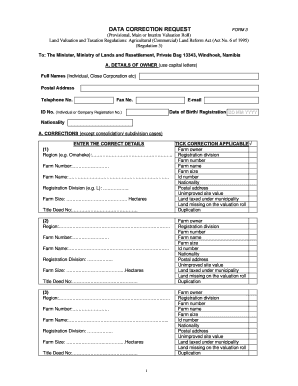
DATA CORRECTION REQUEST FORM 3 (Provisional, Main or Interim Valuation Roll) Land Valuation and Taxation Regulations: Agricultural (Commercial) Land Reform Act (Act No. 6 of 1995) (Regulation 3) To:.

How it works

  1. Open form

    Open form follow the instructions

  2. Easily sign form

    Easily sign the form with your finger

  3. Share form

    Send filled & signed form or save

How to fill out the DATA CORRECTION REQUEST FORM 3 Latest 2007B - 209 88 21 online

Filling out the Data Correction Request Form 3 is essential for ensuring accurate land valuation and taxation records. This guide will walk you through the process of completing the form online, ensuring you provide all necessary information accurately and effectively.

Follow the steps to accurately complete the form online.

  1. Click the ‘Get Form’ button to access the Data Correction Request Form 3 online and open it in your chosen editor.
  2. Fill in the owner details in section A. Provide your full names, postal address, telephone number, fax number, email address, ID number or company registration number, date of birth or registration, and nationality. Ensure that you use capital letters.
  3. In section A, indicate the corrections needed by entering the correct details and ticking the applicable correction options. Specify if you are correcting information related to the farm owner, region, farm number, farm name, farm size, ID number, nationality, postal address, unimproved site value, land taxed under municipality, or any data missing on the valuation roll.
  4. Move on to section B for consolidation if applicable. List the original pieces of land first, providing the region, farm number, farm name, registration division, farm size in hectares, and title deed number for each piece of land. Then, provide details for the consolidated land.
  5. If subdivision is necessary, complete section C. Enter the details for the original piece of land and the remaining portion, followed by the subdivided portions. Ensure to list regions, farm numbers, farm names, registration divisions, farm sizes in hectares, and title deed numbers.
  6. In the space provided for other details, describe any additional corrections needed that have not been covered in previous sections.
  7. Review all entered information for accuracy. This may involve checking names, numbers, and other details to ensure they reflect correct information.
  8. Sign and date the form in the designated area. Indicate your capacity as the owner or representative. If applicable, provide the details of the representative, including full names, postal address, telephone number, ID number, date of birth, and occupation.
  9. Once all sections are complete and reviewed, you can save your changes, download the completed form, print it, or share it as needed.

Complete your Data Correction Request Form online today to ensure your land records are accurate.

Get form

Experience a faster way to fill out and sign forms on the web. Access the most extensive library of templates available.
Get form

Related content

Hazard Analysis and Risk-Based Preventive Controls...
Aug 17, 2016 — Appendix 1: Potential Hazards for Foods and Processes. Appendix 2: Food...
Learn more
September 5, 2012 2010 CENSUS PLANNING MEMORANDA...
Sep 5, 2012 — Statements based on the unweighted data should be ... 5.32 How many units...
Learn more
Technical Guide For Addressing Petroleum Vapor...
Jun 10, 2015 — In response to stakeholder requests, EPA's Office of Underground ... 5...
Learn more

Related links form

Distribution Approval Form - Holbrook Public Schools Titan Tireand4h Form NAP 14.2-C - Sandia National Laboratories - Sandia Download Full Brochure - NSREC - Sandia

Questions & Answers

Get answers to your most pressing questions about US Legal Forms API.

Contact support

A row can be defined as an order in which objects are placed alongside or horizontally. A column can be defined as a vertical division of objects on the basis of category. The arrangement runs from left to right.

Since we wish to indicate the region that we want to split vertically into two halves, a div tag is placed here in the body tag. Give height measurements that are appropriate for your screen if you wish to split the whole body.

You can also manage the columns from the tab menu by clicking on the tab's vertical ellipsis icon and selecting Manage columns. Unlike the Columns button, the tab menu's Manage columns option is limited to rearranging and showing or hiding columns.

0:03 0:47 Easiest Way to Create a Multi-Column Form In WordPress - YouTube YouTube Start of suggested clip End of suggested clip Let me show you how to do it in the form Builder drag the layout field into your form. And thenMoreLet me show you how to do it in the form Builder drag the layout field into your form. And then select the layout that you want to use. Click on the plus icon underneath any column to activate it.

In this example, we will create two equal columns: Float Example. .column { float: left; width: 50%; } /* Clear floats after the columns */ .row:after { content: ""; ... Flex Example. .row { display: flex; } .column { flex: 50%; } Try it Yourself » Example. .column { float: left; } .left { width: 25%; } .right {

In this example, we will create two equal columns: Float Example. .column { float: left; width: 50%; } /* Clear floats after the columns */ .row:after { content: ""; ... Flex Example. .row { display: flex; } .column { flex: 50%; } Try it Yourself » Example. .column { float: left; } .left { width: 25%; } .right {

To split the div into two columns, we set the CSS “width” property to 45% for both class names “left” and “right”. As in the code above, the “float” property should be set to “left” for the class name “left” and “right” for the class name “right”.

The div tag is known as Division tag. The div tag is used in HTML to make divisions of content in the web page like (text, images, header, footer, navigation bar, etc). Div tag has both open (<div>) and closing (</div>) tag and it is mandatory to close the tag.

Get This Form Now!

Use professional pre-built templates to fill in and sign documents online faster. Get access to thousands of forms.
Get form
If you believe that this page should be taken down, please follow our DMCA take down processhere.

Industry-leading security and compliance

US Legal Forms protects your data by complying with industry-specific security standards.
  • In businnes since 1997
    25+ years providing professional legal documents.
  • Accredited business
    Guarantees that a business meets BBB accreditation standards in the US and Canada.
  • Secured by Braintree
    Validated Level 1 PCI DSS compliant payment gateway that accepts most major credit and debit card brands from across the globe.
Get DATA CORRECTION REQUEST FORM 3 Latest 2007B - 209 88 21
Get form
Form Packages
Adoption
Bankruptcy
Contractors
Divorce
Home Sales
Employment
Identity Theft
Incorporation
Landlord Tenant
Living Trust
Name Change
Personal Planning
Small Business
Wills & Estates
Packages A-Z
Form Categories
Affidavits
Bankruptcy
Bill of Sale
Corporate - LLC
Divorce
Employment
Identity Theft
Internet Technology
Landlord Tenant
Living Wills
Name Change
Power of Attorney
Real Estate
Small Estates
Wills
All Forms
Forms A-Z
Form Library
Customer Service
Terms of Service
Privacy Notice
Legal Hub
Content Takedown Policy
Bug Bounty Program
About Us
Blog
Affiliates
Contact Us
Delete My Account
Site Map
Industries
Forms in Spanish
Localized Forms
State-specific Forms
Forms Kit
Legal Guides
Real Estate Handbook
All Guides
Prepared for You
Notarize
Incorporation services
Our Customers
For Consumers
For Small Business
For Attorneys
Our Sites
US Legal Forms
USLegal
FormsPass
pdfFiller
signNow
airSlate WorkFlow
DocHub
Instapage
Social Media
Call us now toll free:
+1 833 426 79 33
As seen in:
  • USA Today logo picture
  • CBC News logo picture
  • LA Times logo picture
  • The Washington Post logo picture
  • AP logo picture
  • Forbes logo picture
© Copyright 1997-2025
airSlate Legal Forms, Inc.
3720 Flowood Dr, Flowood, Mississippi 39232
Form Packages
Adoption
Bankruptcy
Contractors
Divorce
Home Sales
Employment
Identity Theft
Incorporation
Landlord Tenant
Living Trust
Name Change
Personal Planning
Small Business
Wills & Estates
Packages A-Z
Form Categories
Affidavits
Bankruptcy
Bill of Sale
Corporate - LLC
Divorce
Employment
Identity Theft
Internet Technology
Landlord Tenant
Living Wills
Name Change
Power of Attorney
Real Estate
Small Estates
Wills
All Forms
Forms A-Z
Form Library
Customer Service
Terms of Service
Privacy Notice
Legal Hub
Content Takedown Policy
Bug Bounty Program
About Us
Blog
Affiliates
Contact Us
Delete My Account
Site Map
Industries
Forms in Spanish
Localized Forms
State-specific Forms
Forms Kit
Legal Guides
Real Estate Handbook
All Guides
Prepared for You
Notarize
Incorporation services
Our Customers
For Consumers
For Small Business
For Attorneys
Our Sites
US Legal Forms
USLegal
FormsPass
pdfFiller
signNow
airSlate WorkFlow
DocHub
Instapage
Social Media
Call us now toll free:
+1 833 426 79 33
As seen in:
  • USA Today logo picture
  • CBC News logo picture
  • LA Times logo picture
  • The Washington Post logo picture
  • AP logo picture
  • Forbes logo picture
© Copyright 1997-2025
airSlate Legal Forms, Inc.
3720 Flowood Dr, Flowood, Mississippi 39232