Loading
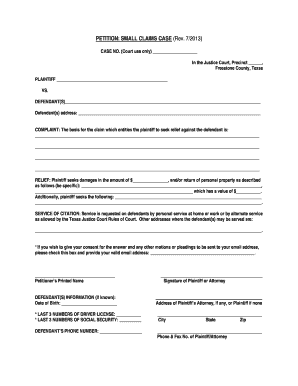
Get Petition: Small Claims Case (rev. 7/2013)
How it works
-

Open form follow the instructions
-

Easily sign the form with your finger
-

Send filled & signed form or save
How to fill out the PETITION: SMALL CLAIMS CASE (Rev. 7/2013) online
Filing a petition in small claims court can be a straightforward process if approached with the right information. This guide provides a clear, step-by-step approach to filling out the PETITION: SMALL CLAIMS CASE (Rev. 7/2013) online, helping users ensure they include all necessary details.
Follow the steps to accurately complete your petition online.
- Press the ‘Get Form’ button to access the petition form and open it in the online editing tool.
- In the ‘Case No.’ field, leave space for court use only. Avoid filling it in yourself.
- Fill in the ‘Plaintiff’ section with your full name, ensuring accuracy.
- Complete the ‘Defendant(s)’ section with the name(s) of the person or entity you are suing.
- Provide the address of the defendant(s) in the designated field. Ensure this information is current and complete.
- In the ‘Complaint’ section, clearly state the reason for your claim. Be specific about the events that led to this action.
- In the ‘Relief’ section, indicate the amount of damages you are seeking. If you wish to recover personal property, describe it here and its value.
- Fill in the ‘Service of Citation’ section by noting how you would like the court to serve the defendants. List any additional addresses if applicable.
- If you consent to receive court documents via email, check the box and enter your valid email address.
- In the ‘Signature’ section, provide your printed name and date of birth. Sign the document as either the plaintiff or, if applicable, your attorney.
- Complete your address details including city, state, and zip code in the designated fields.
- Add the defendant’s phone number, and your phone & fax number if you have an attorney or are representing yourself.
- Once all information is correctly filled in, save your changes, and choose to download, print, or share the completed petition.
Get started today and complete your small claims petition online.
Difference Between a Claim & Cause of Action In some cases, there can be many causes of action. These will all factor into your case. If there is no cause of action, this means the facts presented won't support a lawsuit. Your claim is the section of your lawsuit where you state the damages you wish to recover.