Loading
Get Aku Eb Invigilation
How it works
-

Open form follow the instructions
-

Easily sign the form with your finger
-

Send filled & signed form or save
How to fill out the Aku Eb Invigilation online
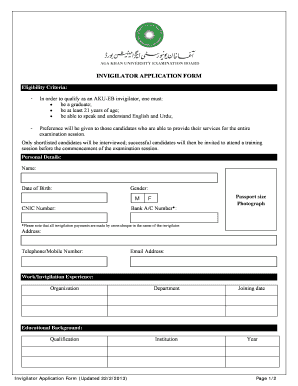
The Aku Eb Invigilation form is an essential document for those seeking to become invigilators for the Aga Khan University Examination Board. This guide provides clear, step-by-step instructions on how to fill out the form online, ensuring you have all the necessary details accurately completed.
Follow the steps to successfully fill out the Aku Eb Invigilation form online:
- Click the ‘Get Form’ button to obtain the form and access it in your preferred online editor.
- Begin filling out your personal details, including your name, date of birth, gender, and relevant identification numbers such as your National Identity Card number and bank account number. Ensure that all details are spelled correctly and are accurate.
- Upload a passport-sized photograph as required in the designated section of the form.
- Provide your contact information, including your residential address, telephone or mobile number, and email address.
- Detail your work or invigilation experience by listing the organizations you have worked with along with the departments, joining dates, and specific roles you held in those institutions.
- In the educational background section, specify your qualifications and relevant educational credentials.
- List two academic or professional references by providing their names, addresses, telephone numbers, and email addresses.
- Indicate your availability for the examination sessions by checking the appropriate boxes for the May and September examination sessions, including AM and PM options.
- Select the city or cities in which you are willing to offer your services as an invigilator.
- Read the disclaimer at the bottom of the form and ensure you understand the conditions laid out. Then, provide your signature and the date confirming that the information is accurate and truthful.
- After completing all sections, review the form for any errors or omissions before saving your changes. You can then download, print, or share the completed form as required.
Take the next step in your career by completing the Aku Eb Invigilation form online today!
Steps to create a business voucher Select the suitable template and update the company logo on the same. Update the supplier details on the same. Enter the invoice details, payment details, description of goods and amount. The voucher is then authorised by the respective accounts payable head.