Loading
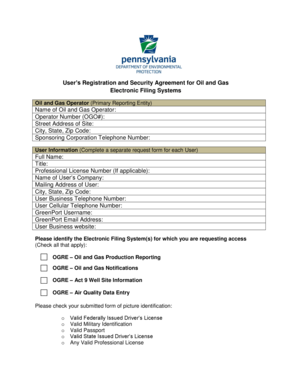
Get User's Registration And Security Agreement For Oil And Gas Electronic Filing Systems
How it works
-

Open form follow the instructions
-

Easily sign the form with your finger
-

Send filled & signed form or save
How to fill out the User's Registration And Security Agreement For Oil And Gas Electronic Filing Systems online
This guide provides a detailed overview of how to complete the User's Registration And Security Agreement For Oil And Gas Electronic Filing Systems online. Following the steps outlined here will help ensure that you accurately fill out the necessary fields and submit your application successfully.
Follow the steps to complete your registration and security agreement.
- Click ‘Get Form’ button to access the registration form and open it in your preferred online editor.
- Begin by entering your Oil and Gas Operator information. Fill in the name of the Oil and Gas Operator, the unique Operator Number (OGO#), and the street address including city, state, and zip code.
- Next, provide the telephone number for the sponsoring corporation associated with the Oil and Gas Operator.
- In the User Information section, complete a separate request form for each individual user. Fill in the full name, title, professional license number if applicable, and the name of the user's company.
- Continue by detailing the user's mailing address, including city, state, and zip code. Also, provide the user’s business telephone number and cellular telephone number.
- Create a GreenPort username and email address for the user. Include the user’s business website if available.
- Select the specific Electronic Filing System(s) for which access is being requested by checking all applicable boxes.
- Indicate the submitted form of picture identification by checking the corresponding box next to the valid form you will provide.
- Read through the security agreement carefully, ensuring full understanding of the terms and conditions outlined. Comply with the agreement by adhering to the outlined responsibilities and obligations.
- Review all the information you have entered in the form for accuracy. Make any necessary corrections.
- Once you are satisfied with the form, you can save the changes, download the completed form, print it, or share it as required.
Complete your User's Registration And Security Agreement online today to ensure timely access to the necessary Electronic Filing Systems.
Industry-leading security and compliance
US Legal Forms protects your data by complying with industry-specific security standards.
-
In businnes since 199725+ years providing professional legal documents.
-
Accredited businessGuarantees that a business meets BBB accreditation standards in the US and Canada.
-
Secured by BraintreeValidated Level 1 PCI DSS compliant payment gateway that accepts most major credit and debit card brands from across the globe.