Loading
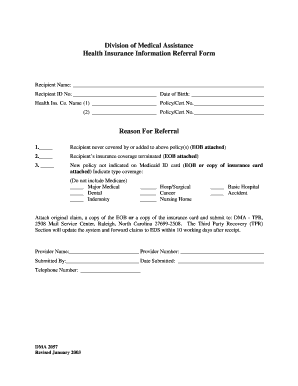
Get Dma 2057 Form
How it works
-

Open form follow the instructions
-

Easily sign the form with your finger
-

Send filled & signed form or save
How to fill out the Dma 2057 Form online
Filling out the Dma 2057 Form online can simplify the process of submitting health insurance information for referral. This guide provides a clear, step-by-step approach to ensure that users complete the form accurately and efficiently.
Follow the steps to successfully complete the Dma 2057 Form online.
- Click ‘Get Form’ button to obtain the form and open it in your chosen editor.
- Begin by entering the recipient's name in the designated field, followed by their ID number and date of birth.
- In the health insurance company name section, fill in the first insurance company’s name, and include the policy or certificate number. If applicable, provide details for a second insurance company.
- Indicate the reason for the referral by selecting one of the pre-defined options. Make sure to attach any required documentation such as Explanation of Benefits (EOB) where specified.
- Specify the type of coverage that applies, if the new policy is not indicated on the Medicaid ID card. Mark all applicable coverage types clearly.
- Provide details about the provider's name and their number to ensure that the claim can be processed correctly.
- Complete the section for the person who is submitting the form, including their name, the date of submission, and a contact telephone number.
- Once you have filled in all required fields, review the information for accuracy. Save your changes, then download the form, or print it as needed for submission.
- If selecting to submit electronically, ensure that the completed Dma 2057 Form is sent to the appropriate address: DMA - TPR, 2508 Mail Service Center, Raleigh, North Carolina 27699-2508.
Get started by filling the Dma 2057 Form online today!
NC Medicaid Ombudsman: 877-201-3750 Stay in touch!