Loading
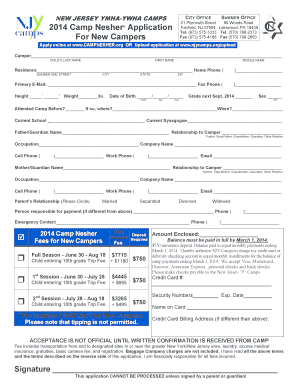
Get 2014 Camp Nesher Application For New Campers - New Jersey ...
How it works
-

Open form follow the instructions
-

Easily sign the form with your finger
-

Send filled & signed form or save
How to fill out the 2014 Camp Nesher Application For New Campers - New Jersey online
This guide provides comprehensive instructions on completing the 2014 Camp Nesher Application for new campers online. By following these steps, you will ensure that all required information is accurately submitted for your child's enrollment.
Follow the steps to successfully complete your application.
- Click ‘Get Form’ button to access the application form and open it in your preferred digital editor.
- Begin filling out the camper’s personal information, which includes the child’s last name, first name, middle name, and contact details such as home phone and primary email.
- Provide the camper’s height, weight, date of birth, and grade for the upcoming school year.
- Indicate whether the child has attended camp before and specify the previous camp location and year.
- Enter the names and contact information for both parents or guardians, including their relationship to the camper, occupation, and phone numbers.
- Complete the sections regarding the person responsible for payment and any emergency contacts, ensuring to include their phone numbers.
- Review the deposit amount required and select the payment method while ensuring all necessary payment information is provided.
- Read and acknowledge the terms of enrollment by signing the application, ensuring that a parent or guardian's signature is present, as this is crucial for processing.
- After filling out the entire form, you can save the changes, download a copy, print it for your records, or share it as required.
Complete your application online today to secure your child's spot at Camp Nesher!
On each form, mandatory fields must be clearly indicated: A distinctive sign (“*” symbol, “mandatory” mention, etc.) ... If a symbol is used to declare mandatory fields, a statement placed at the beginning of the form must indicate that the symbol stands for a mandatory field.
Industry-leading security and compliance
US Legal Forms protects your data by complying with industry-specific security standards.
-
In businnes since 199725+ years providing professional legal documents.
-
Accredited businessGuarantees that a business meets BBB accreditation standards in the US and Canada.
-
Secured by BraintreeValidated Level 1 PCI DSS compliant payment gateway that accepts most major credit and debit card brands from across the globe.