Loading
Get Epirb Functions Form
How it works
-

Open form follow the instructions
-

Easily sign the form with your finger
-

Send filled & signed form or save
How to fill out the Epirb Functions Form online
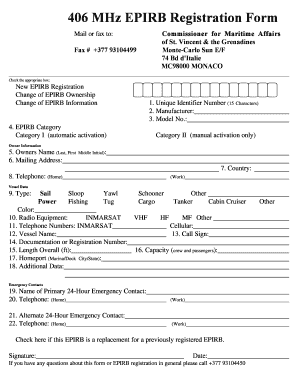
Filling out the Epirb Functions Form online is an essential step for ensuring your vessel's safety and compliance. This guide will walk you through each section of the form, making the process straightforward and approachable, regardless of your experience with similar documents.
Follow the steps to complete your Epirb Functions Form effectively.
- Click the ‘Get Form’ button to access the Epirb Functions Form in your online document management system.
- Select the appropriate box indicating whether you are registering a new EPIRB, changing EPIRB ownership, or updating EPIRB information.
- Enter your Unique Identifier Number, which should be exactly 15 characters long, in the designated field.
- Provide the manufacturer's name of the EPIRB in the 'Manufacturer' field.
- Fill in the model number of the EPIRB in the 'Model No.' section.
- Choose the EPIRB category by selecting either 'Category I' for automatic activation or 'Category II' for manual activation only.
- Complete the 'Owner Information' section by entering the owner's name (last, first, and middle initial), along with the mailing address.
- Input the country of residence and a home telephone number in the appropriate fields.
- In the 'Vessel Data' section, specify the type of vessel by selecting the proper designation such as Sail or Power and further categorizing it as needed.
- Indicate the color of your vessel.
- Select the radio equipment on board, such as INMARSAT, VHF, or other types.
- Provide both INMARSAT and cellular telephone numbers in their respective fields.
- Enter the vessel name and call sign as required.
- Include the documentation or registration number, along with the length overall in feet.
- State the vessel's capacity for crew and passengers.
- List the homeport, specifying the marina or dock along with the city and state.
- Fill out any additional data pertinent to the registration.
- In the 'Emergency Contacts' section, provide the name and telephone number of a primary and an alternate 24-hour emergency contact.
- If applicable, check the box indicating that this EPIRB is a replacement for a previously registered EPIRB.
- Finally, sign and date the form to complete your submission.
- Once all fields are filled out, save your changes, download, print, or share the completed form as needed.
Complete the Epirb Functions Form online today to ensure your vessel's registration is up to date.
NOTE: IMO Resolution MSC. 471(101) includes the addition of an integral GNSS receiver, an AIS locating transmitter, a light visible to night vision devices and a Return Link Service to confirm the distress signal has been received.
Industry-leading security and compliance
US Legal Forms protects your data by complying with industry-specific security standards.
-
In businnes since 199725+ years providing professional legal documents.
-
Accredited businessGuarantees that a business meets BBB accreditation standards in the US and Canada.
-
Secured by BraintreeValidated Level 1 PCI DSS compliant payment gateway that accepts most major credit and debit card brands from across the globe.