Loading
Get Estate Inventory
How it works
-

Open form follow the instructions
-

Easily sign the form with your finger
-

Send filled & signed form or save
How to fill out the Estate Inventory online
Filling out the Estate Inventory form is a crucial step in managing the estate of a deceased individual. This guide provides a clear and supportive approach to help you navigate each section of the form effectively, ensuring that all required information is accurately captured.
Follow the steps to complete the Estate Inventory online.
- Press the ‘Get Form’ button to access the Estate Inventory form online and open it in your browser.
- Begin by entering the decedent's full name in the designated field, along with their case number, which can be found on official court documents. This information identifies the estate you are managing.
- Complete the section for the personal representative, which includes their name, address, phone number, and email. This person is responsible for managing the estate's inventory.
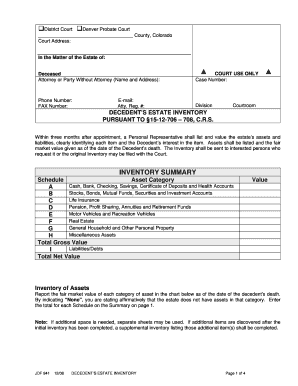
- In the Inventory Summary section, categorize the estate's assets according to the specified schedules (A to H). Ensure to report the fair market value for each category as of the decedent's date of death.
- For Schedule A, list cash and banking information. Specify the type of account, institution name, account number (last four digits), and the current balance. If no assets are present, indicate 'None.'
- Continue to Schedule B through H, detailing items like stocks, life insurance, real estate, motor vehicles, personal property, and any miscellaneous assets, ensuring accurate valuations and noting 'None' where applicable.
- In Schedule I, report the estate's liabilities and debts. Include descriptions, financial institution names, account numbers (last four digits), and outstanding balances for categories such as mortgages and credit card debts.
- Once all fields are filled out, affirm the accuracy of the inventory by signing and dating the document in the space provided for the personal representative.
- Finally, review the completed inventory for any errors, then save your changes. You can download a copy for your records, print it, or share it as needed.
Complete your Estate Inventory online today to streamline the management of your estate.
Get form
Experience a faster way to fill out and sign forms on the web. Access the most extensive library of templates available.
What Is Included On a Pennsylvania Estate Inventory? The personal representative must include on the inventory all real and personal estate of the decedent, except for real estate outside of Pennsylvania. An ancillary personal representative shall include only assets for which he or she is responsible.
Get This Form Now!
Use professional pre-built templates to fill in and sign documents online faster. Get access to thousands of forms.