Loading
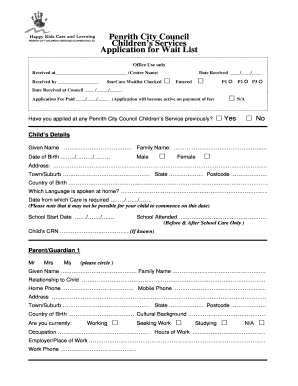
Get Penrith City Council Children's Services Application For Wait List
How it works
-

Open form follow the instructions
-

Easily sign the form with your finger
-

Send filled & signed form or save
How to fill out the Penrith City Council Children's Services application for wait list online
Filling out the Penrith City Council Children's Services Application for Wait List online is a straightforward process. This guide will assist you through each section of the form, ensuring that you provide all necessary information clearly and accurately.
Follow the steps to successfully complete the application form.
- Click the ‘Get Form’ button to access the application form. Make sure to have any required information handy as you proceed.
- Begin by providing details about your child. Enter their given name, family name, date of birth, gender, address, town/suburb, state, postcode, country of birth, and the language spoken at home.
- Indicate the date from which care is required. Note that it may not be feasible for your child to start on this date. Also, provide the school start date and school attended if applicable.
- Complete the child’s CRN if known, as this will help streamline the application process.
- Next, provide details for Parent/Guardian 1. This includes their title, name, relationship to the child, contact numbers, address, country of birth, occupation, and current work status.
- Repeat step 5 for Parent/Guardian 2, ensuring you include all necessary details.
- Specify your care requirements by selecting if a sibling is enrolled and choose from the options provided for services and care types.
- Identify the days and times you require care for your child. Fill in the start and end times for each day.
- Provide any additional information regarding your child's background, needs, or any other details relevant to the application.
- Finally, sign and date the application. Review all entered information for accuracy before submission.
- Once completed, save your changes and choose to download, print, or share the form as needed.
Begin your online application by following these steps carefully to ensure a smooth submission process.
Pitfalls in Creating a Statement of Work If the work statement is too vague, too broad, or too generic, it can leave room for multiple interpretations. This can create misunderstandings later in a project.
Industry-leading security and compliance
US Legal Forms protects your data by complying with industry-specific security standards.
-
In businnes since 199725+ years providing professional legal documents.
-
Accredited businessGuarantees that a business meets BBB accreditation standards in the US and Canada.
-
Secured by BraintreeValidated Level 1 PCI DSS compliant payment gateway that accepts most major credit and debit card brands from across the globe.