Loading
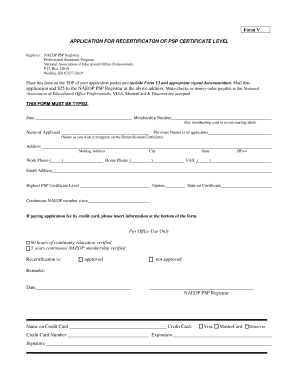
Get Naeop Psp Form 1
How it works
-

Open form follow the instructions
-

Easily sign the form with your finger
-

Send filled & signed form or save
How to fill out the Naeop Psp Form 1 online
Navigating the recertification process can be straightforward with the right guidance. This guide will help you fill out the Naeop Psp Form 1 online, ensuring all necessary information is provided accurately and clearly.
Follow the steps to successfully complete the Naeop Psp Form 1.
- Click ‘Get Form’ button to obtain the form and open it in the editor.
- Fill in the 'Date' field with the current date.
- Enter your 'Membership Number' as found on your membership card or recent mailing label.
- Input your 'Name of Applicant' as you wish it to appear on the Recertification Certificate.
- If applicable, list any 'Previous Name(s)' you have used.
- Complete the 'Address' section, ensuring to include your mailing address.
- Provide your 'Work Phone' and 'Home Phone,' including area codes.
- Enter your 'City,' 'State,' and 'ZIP+4' code.
- Fill in the 'Date on Certificate' as stated on your current certificate.
- Input your 'Email Address' for communication purposes.
- Select your 'Highest PSP Certificate Level'.
- Indicate how long you have been a continuous NAEOP member.
- If you are using a credit card to pay the application fee, provide the necessary details at the bottom of the form, including the 'Name on Credit Card' and 'Credit Card Number.'
- Sign the form and input the 'Expiration' date of your credit card.
- Select the type of credit card you are using: Visa, MasterCard, or Discover.
- Review all information for accuracy before saving changes, downloading, printing, or sharing the form.
Complete your documents online to ensure a smooth recertification process.