Loading
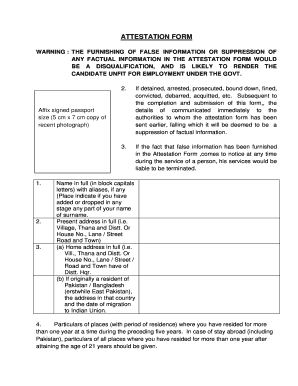
Get Sscsrgovin Com Form
How it works
-

Open form follow the instructions
-

Easily sign the form with your finger
-

Send filled & signed form or save
How to fill out the Sscsrgovin Com Form online
Filling out the Sscsrgovin Com Form online is a crucial step for candidates seeking government employment. This guide will provide clear and concise instructions to help users navigate through each section of the form with ease.
Follow the steps to successfully complete the Sscsrgovin Com Form online.
- Press the ‘Get Form’ button to access the form and open it in your digital editor.
- Carefully review the instructions provided at the top of the form. Pay special attention to the warning regarding the provision of false information.
- Affix a recent passport-sized photograph (5 cm x 7 cm) in the designated area.
- Fill in your full name in block capitals, including any aliases, and specify any changes to your name or surname.
- Provide your present address with complete details, including village, district, and street name.
- If applicable, provide your home address, including details of your original residence if you migrated from Pakistan or Bangladesh.
- List all places where you have resided for more than one year in the past five years. Include any stays abroad, especially after turning 21.
- Provide detailed information on your parents, spouse, and siblings.
- Answer the questions regarding your employment history with complete particulars, including previous job titles and dates of service.
- Respond to the series of questions about arrests, prosecutions, or disciplinary actions by selecting 'Yes' or 'No' and provide details if necessary.
- Identify two responsible references from your locality.
- Certify the accuracy of the information provided by signing the form, including the date and place.
- Once complete, save any changes made to the form. Download or print a copy for your records, and ensure you submit it according to the instructions provided.
Complete your Sscsrgovin Com Form online today to proceed with your government employment application!
The first digit represents the region in India. The second digit is the sub-region, while the third digit is the sorting district. The last three digits represent the particular post office within the district.