Loading
Form preview
  • US Legal Forms
  • Form Library
  • More Forms
  • More Uncategorized Forms
  • Pens. E/2 - Unjspf Website - Sas Undp

Get Pens. E/2 - Unjspf Website - Sas Undp

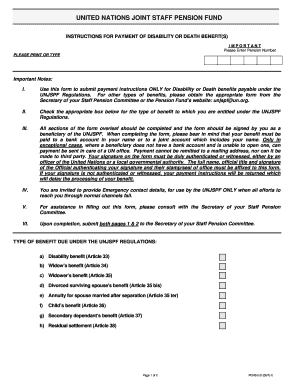
UNITED NATIONS JOINT STAFF PENSION FUND INSTRUCTIONS FOR PAYMENT OF DISABILITY OR DEATH BENEFIT(S) IMPORTANT Please Enter Pension Number PLEASE PRINT OR TYPE Important Notes: I. Use this form to submit.

How it works

  1. Open form

    Open form follow the instructions

  2. Easily sign form

    Easily sign the form with your finger

  3. Share form

    Send filled & signed form or save

How to fill out the Pens. E/2 - UNJSPF form online

This guide provides clear and professional instructions for filling out the Pens. E/2 form for disability or death benefits under the United Nations Joint Staff Pension Fund. This document will assist you through each section of the form, ensuring accurate completion.

Follow the steps to complete the form efficiently.

  1. Click the ‘Get Form’ button to obtain the form and open it in the editor.
  2. Begin by entering your pension number in the specified field. This number is essential for processing your payment instructions.
  3. Complete your personal information by providing your surname, first name, and middle name. Make sure this information is accurate, as it must match your recorded details.
  4. Select the type of benefit you are applying for by checking the appropriate box. Review the benefit options available and ensure that you select the correct one based on your eligibility.
  5. Indicate the currency of payment and specify the account type, whether it is checking or savings. This information is crucial for ensuring that funds are transferred correctly.
  6. Provide the name of the financial institution, your bank account number or IBAN, and other relevant identifiers such as SWIFT code and local routing codes. These details help facilitate secure international transfers.
  7. Fill in your contact details, including your mailing address, email, and telephone number. This information allows the Fund to reach you if needed.
  8. If applicable, provide emergency contact details. Include the name, relationship, email, mailing address, and telephone number of your emergency contact.
  9. Sign and date the form. Your signature must be authenticated or witnessed by a United Nations officer or a governmental authority. Ensure this verification is complete to avoid delays.
  10. Once all sections are completed and verified, submit both pages of the form to the Secretary of your Staff Pension Committee. Retain a copy for your records.
  11. Remember, the form must bear original signatures; submissions via fax or email are not accepted.

Complete your Pens. E/2 form online today to ensure your benefits are processed without delay.

Get form

Experience a faster way to fill out and sign forms on the web. Access the most extensive library of templates available.
Get form

Related content

Untitled
G PEN SLIM VEAGORIZER بررسی. بازگشت به کوپن لباس مدرسه قابل...
Learn more
Untitled
G PEN SLIM VEAGORIZER بررسی. بازگشت به کوپن لباس مدرسه قابل...
Learn more

Related links form

When Good Men Behave Badly Bullying Course Test - Commonwealth Educational Seminars This Emotional Life 1 Commonwealth Educational Seminars Ce Ethics In Plain English Commonwealth Educational Seminars

Questions & Answers

Get answers to your most pressing questions about US Legal Forms API.

Contact support

Eligibility. A UN pension is payable to a participant whose age on separation is the normal retirement age or more and whose contributory service was five years or longer.

Pensions are calculated on the basis of the staff member's final average remuneration, defined as the average of pensionable remuneration for the highest 36 months of the last five years of service. Benefits accumulation rates vary ing to the date on which the staff member joined the Fund.

UN Joint Staff Pension Fund (NY) 1 (212) 963-6931By Telephone1 (212) 963-3146By Fax1 (833) 668-6931Toll Free (USA)Mondays to Fridays: 9:00 am - 5:00 pmIn Person Visits(Except Thursdays)3 more rows

Eligibility commences upon entering the service of a United Nations Joint Staff Pension Fund (UNJSPF) member organization with an appointment for 6 months or more OR upon completing 6 months of continuous service without an interruption of more than 30 days, provided that participation in the Fund is not expressly ...

1. Is the pension of a UN retiree taxable in the United States? UN monthly pensions received by all U.S. citizens or resident aliens are always taxable wherever the UN retiree is living, in the U.S. or elsewhere.

Established in 1949 by the United Nations General Assembly, UNJSPF provides retirement, death, disability and related benefits for staff of the United Nations and other member organizations. The UN pension plan is a defined benefit plan which is not dependent on the investment return or longevity.

Net assets available for benefits at 31 December 2021 were US$91,459.6 million (2020: US$81,511.7 million).. In June 2022, the value of the assets was estimated at US$78 billion.

Performance of the investments Net assets available for benefits at 31 December 2021 were US$91,459.6 million (2020: US$81,511.7 million).. In June 2022, the value of the assets was estimated at US$78 billion.

Get This Form Now!

Use professional pre-built templates to fill in and sign documents online faster. Get access to thousands of forms.
Get form
If you believe that this page should be taken down, please follow our DMCA take down processhere.
Get Pens. E/2 - UNJSPF Website - Sas Undp
Get form
  • Adoption
  • Bankruptcy
  • Contractors
  • Divorce
  • Home Sales
  • Employment
  • Identity Theft
  • Incorporation
  • Landlord Tenant
  • Living Trust
  • Name Change
  • Personal Planning
  • Small Business
  • Wills & Estates
  • Packages A-Z
  • Affidavits
  • Bankruptcy
  • Bill of Sale
  • Corporate - LLC
  • Divorce
  • Employment
  • Identity Theft
  • Internet Technology
  • Landlord Tenant
  • Living Wills
  • Name Change
  • Power of Attorney
  • Real Estate
  • Small Estates
  • Wills
  • All Forms
  • Forms A-Z
  • Form Library
  • Legal Hub
  • About Us
  • Help Portal
  • Legal Resources
  • Blog
  • Affiliates
  • Contact Us
  • Delete My Account
  • Site Map
  • Industries
  • Forms in Spanish
  • Localized Forms
  • State-specific Forms
  • Forms Kit
  • Real Estate Handbook
  • All Guides
  • Notarize
  • Incorporation services
  • For Consumers
  • For Small Business
  • For Attorneys
  • USLegal
  • FormsPass
  • pdfFiller
  • signNow
  • altaFlow
  • DocHub
  • Instapage
Form Packages
  • Adoption
  • Bankruptcy
  • Contractors
  • Divorce
  • Home Sales
  • Employment
  • Identity Theft
  • Incorporation
  • Landlord Tenant
  • Living Trust
  • Name Change
  • Personal Planning
  • Small Business
  • Wills & Estates
  • Packages A-Z
Form Categories
  • Affidavits
  • Bankruptcy
  • Bill of Sale
  • Corporate - LLC
  • Divorce
  • Employment
  • Identity Theft
  • Internet Technology
  • Landlord Tenant
  • Living Wills
  • Name Change
  • Power of Attorney
  • Real Estate
  • Small Estates
  • Wills
  • All Forms
  • Forms A-Z
  • Form Library
Customer Service
  • Legal Hub
  • About Us
  • Help Portal
  • Legal Resources
  • Blog
  • Affiliates
  • Contact Us
  • Delete My Account
  • Site Map
  • Industries
  • Forms in Spanish
  • Localized Forms
  • State-specific Forms
  • Forms Kit
Legal Guides
  • Real Estate Handbook
  • All Guides
Prepared for you
  • Notarize
  • Incorporation services
Our Customers
  • For Consumers
  • For Small Business
  • For Attorneys
Our Sites
  • USLegal
  • FormsPass
  • pdfFiller
  • signNow
  • altaFlow
  • DocHub
  • Instapage
Social Media
Call us now toll free:
+1 833 426 79 33
As seen in:
© Copyright 1999-2026 airSlate Legal Forms, Inc. 3720 Flowood Dr, Flowood, Mississippi 39232
  • Your Privacy Choices
  • Terms of Service
  • Privacy Notice
  • Content Takedown Policy
  • Bug Bounty Program