Loading
Get Sample Filled In And Signed Bn1 Form
How it works
-

Open form follow the instructions
-

Easily sign the form with your finger
-

Send filled & signed form or save
How to fill out the Sample Filled In And Signed Bn1 Form online
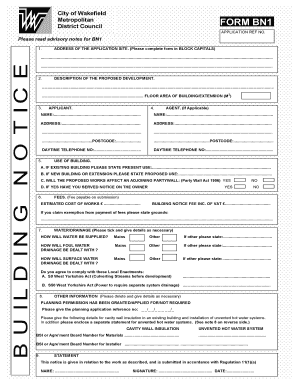
Filling out the Sample Filled In And Signed Bn1 Form online can be a straightforward process if you follow the instructions carefully. This guide will walk you through each section of the form, ensuring that you complete it accurately and efficiently.
Follow the steps to fill out the form correctly.
- Click ‘Get Form’ button to obtain the form and open it in the editor.
- In section 1, provide the address of the application site using BLOCK CAPITALS for clarity. Ensure all details are accurate to avoid processing delays.
- In section 2, describe the proposed development succinctly and include the floor area of the building or extension in square meters (m2).
- Complete section 3 by entering the applicant's details. If there is an agent involved, fill out section 4 with their name and address as applicable.
- In section 5, specify the existing use of the building if it is not new, or mention the proposed use if it is. Answer the question regarding any effects on adjoining party walls.
- Section 6 requires you to state the estimated cost of works and the building notice fee including VAT. If you are claiming an exemption from fees, provide the necessary grounds.
- In section 7, indicate how water will be supplied and how drainage will be managed for foul and surface water. Use the provided options and provide details where necessary.
- Fill out section 8 with other relevant information, including planning permission status and any required numbers for cavity wall insulation and unvented hot water systems.
- Finally, in section 9, provide a statement regarding the work described. Enter your name, signature, and date to certify the application.
- Once you have completed all sections, save your changes, download, print, or share the form as needed.
Start completing your documents online today!
Step 1: Decide what the title of your affidavit will be. Step 2: Put the name and personal background information of the person giving the information in the first paragraph. Step 3: Write an opening sentence in the first person tense. Step 4: Make an outline of the information given or state the facts of the case.
Industry-leading security and compliance
US Legal Forms protects your data by complying with industry-specific security standards.
-
In businnes since 199725+ years providing professional legal documents.
-
Accredited businessGuarantees that a business meets BBB accreditation standards in the US and Canada.
-
Secured by BraintreeValidated Level 1 PCI DSS compliant payment gateway that accepts most major credit and debit card brands from across the globe.