Loading
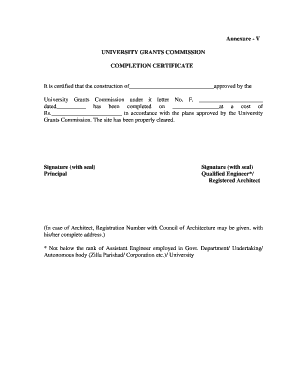
Get Xi Plan Guidelines Construction Of Women's Hostel College - Ugc Ac
How it works
-

Open form follow the instructions
-

Easily sign the form with your finger
-

Send filled & signed form or save
How to fill out the XI Plan Guidelines Construction Of Women's Hostel College - Ugc Ac online
Filling out the XI Plan Guidelines Construction Of Women's Hostel College - Ugc Ac is a crucial step for institutions seeking support from the University Grants Commission. This guide will provide you with clear, step-by-step instructions to successfully complete the form online.
Follow the steps to accurately complete the form.
- Click ‘Get Form’ button to obtain the form and open it in the editor.
- Begin by entering the name of the construction project, specifically the name of the women's hostel, in the designated field. Ensure the name is spelled correctly for accurate documentation.
- In the next field, provide the approval number issued by the University Grants Commission. This number is critical for verifying the legitimacy of your project.
- Enter the date of approval in the specified format. This date indicates when the University Grants Commission officially approved your construction project.
- Fill in the completion date of the construction project. This date reflects when the building was officially completed.
- Detail the total cost incurred for the construction project. Make sure to enter the amount in Indian Rupees (Rs.) with correct digits to avoid discrepancies.
- Confirm that the construction has been executed according to the approved plans by checking the corresponding box. This ensures compliance with the guidelines set forth by the University Grants Commission.
- The next section requires the signature and seal of the principal of the college, confirming the completion of the project.
- Lastly, provide the signature and seal of a qualified engineer or registered architect responsible for the project. If applicable, include the registration number with the Council of Architecture and their complete address.
- Review all entered information for accuracy, then save changes, download, print, or share the completed form as necessary to meet submission guidelines.
Complete your documents online for efficient processing and approval.
Self-attestation simply requires you to place your signature on a photocopy of the document you want to certify. After you have a made a clean copy of your document, write a statement on it such as: “True copy” or “Self-attested copy”. Then place your signature directly under it.
Industry-leading security and compliance
US Legal Forms protects your data by complying with industry-specific security standards.
-
In businnes since 199725+ years providing professional legal documents.
-
Accredited businessGuarantees that a business meets BBB accreditation standards in the US and Canada.
-
Secured by BraintreeValidated Level 1 PCI DSS compliant payment gateway that accepts most major credit and debit card brands from across the globe.