Loading
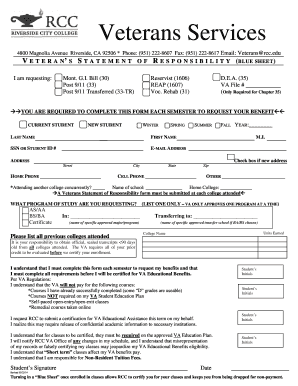
Get Blue Sheet - Riverside Community College - Rcc
How it works
-

Open form follow the instructions
-

Easily sign the form with your finger
-

Send filled & signed form or save
How to fill out the Blue Sheet - Riverside Community College - Rcc online
Completing the Blue Sheet is an essential step for veterans seeking educational benefits at Riverside Community College. This guide provides user-friendly instructions to help you navigate the form accurately and effectively.
Follow the steps to fill out the Blue Sheet correctly.
- Click the ‘Get Form’ button to access the Blue Sheet. This will open the form in your preferred editor for completion.
- Indicate your status by selecting the applicable benefit type at the top of the form, such as Mont. G.I. Bill or Post 9/11. This helps RCC understand your eligibility.
- Fill out your personal information in the specified fields, including last name, first name, middle initial, social security number or student ID, email address, and phone numbers.
- Select the term for which you are requesting benefits (Winter, Spring, Summer, or Fall) and provide the year.
- Enter your home address in the given sections, ensuring you check the box if this is a new address.
- Indicate your home college and specify if you are attending another college concurrently. If so, list the name of that school.
- Select the program of study you are requesting (AS/AA, BS/BA, or Certificate) and write down the specific program you'll be following.
- List all previous colleges attended along with the units earned. Remember, official sealed transcripts from these colleges are required for the VA evaluation.
- Review and initial the sections stating your understanding of the VA regulations regarding benefit payments and course eligibility.
- Finally, sign and date the form. This confirms your request for RCC to certify your enrollment and acknowledges that you understand the responsibility you carry if any discrepancies arise.
- Once all sections are completed, save your changes, download the form, print it for your records, or share it with the relevant office as needed.
Complete your Blue Sheet online today to ensure timely processing of your educational benefits!
A student must have a minimum grade point average a 2.0 (“C” average) in degree applicable coursework taken at Riverside Community College District.
Industry-leading security and compliance
US Legal Forms protects your data by complying with industry-specific security standards.
-
In businnes since 199725+ years providing professional legal documents.
-
Accredited businessGuarantees that a business meets BBB accreditation standards in the US and Canada.
-
Secured by BraintreeValidated Level 1 PCI DSS compliant payment gateway that accepts most major credit and debit card brands from across the globe.