Loading
Get Direct Deposit Form - State Teachers Retirement System Of Ohio - Strsoh
How it works
-

Open form follow the instructions
-

Easily sign the form with your finger
-

Send filled & signed form or save
How to fill out the DIRECT DEPOSIT FORM - State Teachers Retirement System Of Ohio - Strsoh online
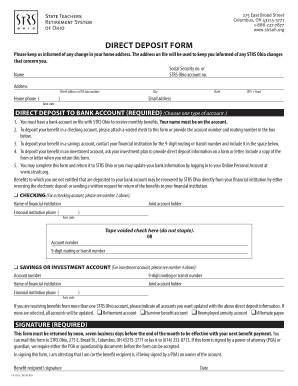
Filling out the Direct Deposit Form for the State Teachers Retirement System of Ohio is an important step to ensure that your benefits are deposited directly into your bank account. This guide provides clear, step-by-step instructions to help you navigate the online form with ease.
Follow the steps to complete your direct deposit form online.
- Click ‘Get Form’ button to obtain the form and open it in the editor.
- Enter your full name as it appears on your STRS Ohio account along with your Social Security number and STRS Ohio account number. This information is vital for identifying your account.
- Provide your current home address, including street address or P.O. box, city, state, and ZIP code. Make sure this information is up-to-date as it will be used for all official communications.
- Fill in your home phone number and email address. This information helps STRS Ohio to contact you regarding any changes or important updates.
- Select the type of bank account for direct deposit - checking, savings, or investment account. Ensure that the bank account is in your name.
- For a checking account, attach a voided check or enter the account number and routing number directly into the form. For a savings account, refer to your financial institution for the routing number.
- If you are opting for an investment account, request direct deposit details from your investment plan and attach the required documentation.
- Indicate any other STRS Ohio accounts you wish to update with the new direct deposit information. Be specific if it involves multiple accounts.
- Sign and date the form. If a Power of Attorney (POA) or guardian is signing on your behalf, include the necessary documents. Remember, this form must be submitted seven business days before the end of the month to take effect with your next benefit payment.
- Once completed, save your changes. You may choose to download, print, and/or share the form as needed. Submit it to STRS Ohio via mail or fax as per the instructions provided.
Complete your direct deposit form online today to ensure you receive your benefits promptly.
starting or changing Direct Deposit online (Social Security benefits only), or. contacting your bank, credit union or savings and loan association, or. calling Social Security toll-free at 1-800-772-1213 (TTY 1-800-325-0778), or. visiting your local Social Security Field Office.
Industry-leading security and compliance
US Legal Forms protects your data by complying with industry-specific security standards.
-
In businnes since 199725+ years providing professional legal documents.
-
Accredited businessGuarantees that a business meets BBB accreditation standards in the US and Canada.
-
Secured by BraintreeValidated Level 1 PCI DSS compliant payment gateway that accepts most major credit and debit card brands from across the globe.