Loading
Form preview
  • US Legal Forms
  • Other Templates
  • More Forms
  • More Uncategorized Forms
  • Alarm Permit Application - San Joaquin County - Sjgov

Get Alarm Permit Application - San Joaquin County - Sjgov

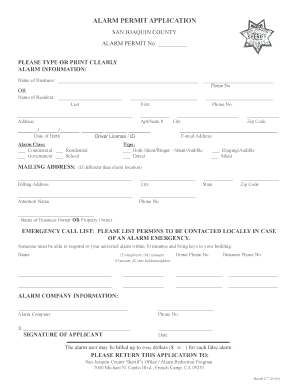
Please fill out information, alarm Permit aPPlication SAN JOAQUIN COUNTY ALARM PERMIT No. Please tyPe or Print clearly alarm information: Name of Business: OR Name of Resident: Phone No. Last First.

How it works

  1. Open form

    Open form follow the instructions

  2. Easily sign form

    Easily sign the form with your finger

  3. Share form

    Send filled & signed form or save

How to fill out the Alarm Permit Application - San Joaquin County - Sjgov online

Filling out the Alarm Permit Application for San Joaquin County can be a straightforward process if you follow the right steps. This guide provides a step-by-step approach to help users complete the application online efficiently.

Follow the steps to successfully complete your application.

  1. Click ‘Get Form’ button to obtain the application form and open it for editing.
  2. Begin by filling out the alarm information section. Enter the name of your business or the name of the resident applying for the permit. Be sure to clearly print or type the information.
  3. Provide a valid phone number for contact purposes. Fill in your last name, first name, and date of birth. Include your driver’s license or identification number for verification.
  4. In the address field, input the complete street address, including apartment or suite number if applicable. Add the city and zip code as well.
  5. Next, enter your email address for further communication regarding the permit.
  6. Select the type of alarm system you are applying for by checking the appropriate box — whether it is both silent/ringer, silent/audible, or direct.
  7. Indicate the alarm class by selecting one from the options provided: commercial, residential, government, or school.
  8. If the mailing address is different from the alarm location, fill in the corresponding information, including the billing address and attention name.
  9. Provide the contact details for an emergency call list. List individuals who can respond to your alarm within 30 minutes along with their phone numbers.
  10. Include your alarm company information, ensuring to write the company name and contact number.
  11. Lastly, sign and date the application as the applicant, acknowledging that you understand the billing policy for false alarms.
  12. Once you have filled out all required sections, you can save your changes, download the form, print it for your records, or share it if necessary.

Complete your Alarm Permit Application online today to ensure compliance and safety.

Get form

Experience a faster way to fill out and sign forms on the web. Access the most extensive library of templates available.
Get form

Related content

Alarms - City of Stockton
Stockton Police Department · Businesses: Renew alarm permits annually. · Homeowners:...
Learn more
Students - Online Student Services | San Joaquin...
Classes at South Campus · Contact, Directions, & Parking · Student Services at South...
Learn more
Industrial Field Switch - GarrettCom
Four-Port 10 MB and 100Mb mm Fiber ST Modules .............. ... 5.2.5 6KP8-MTRJ, 8 @100Mb...
Learn more

Related links form

Record Of Annual Inspection Registro De La Inspecci N Anual Request For Correction Of Erroneous Safety Performance History ... Keller And Assoc Straight Bill Of Lading Instructions Form ANNUAL VEHICLE INSPECTION LABEL - JJ Keller & Associates

Questions & Answers

Get answers to your most pressing questions about US Legal Forms API.

Contact support

False Alarm Fees and Penalties An alarm system user with a valid permit will be billed a penalty assessment of $50 for the second false alarm within 365 days of the first false alarm. The penalty assessment will increase by $50 increments for each additional false alarm incurred during a 365-day period.

To obtain an alarm permit, you can apply online, contact us, or visit an Office of Finance branch office before 3:00 p.m. Provide your alarm company with your permit number and updated emergency contact information.

How much is the permit? The one-time fee is $176. You are not required to renew this permit. It will be valid as long as you are the owner of the property.

Yes. You are required by law to obtain an alarm permit. See below for the cost. How much is the fee for an alarm permit?

Alarm Permits & Payments The City of San Diego requires permits for burglary, robbery, fire and harmful gas alarm systems for both residential and commercial properties. You may apply and pay your alarm permit fees online. You can also download, fill in and print the application.

Alarm Permit For your convenience, the Office of Finance accepts on-line payments for alarm permits, or you can visit the Office of Finance at one of their branch locations. The cost for an alarm permit is $43. The cost to renew your alarm permit is $26.

Get This Form Now!

Use professional pre-built templates to fill in and sign documents online faster. Get access to thousands of forms.
Get form
If you believe that this page should be taken down, please follow our DMCA take down processhere.
Get Alarm Permit Application - San Joaquin County - Sjgov
Get form
  • Adoption
  • Bankruptcy
  • Contractors
  • Divorce
  • Home Sales
  • Employment
  • Identity Theft
  • Incorporation
  • Landlord Tenant
  • Living Trust
  • Name Change
  • Personal Planning
  • Small Business
  • Wills & Estates
  • Packages A-Z
  • Affidavits
  • Bankruptcy
  • Bill of Sale
  • Corporate - LLC
  • Divorce
  • Employment
  • Identity Theft
  • Internet Technology
  • Landlord Tenant
  • Living Wills
  • Name Change
  • Power of Attorney
  • Real Estate
  • Small Estates
  • Wills
  • All Forms
  • Forms A-Z
  • Other Templates
  • Legal Hub
  • About Us
  • Help Portal
  • Legal Resources
  • Blog
  • Affiliates
  • Contact Us
  • Delete My Account
  • Site Map
  • Industries
  • Forms in Spanish
  • Localized Forms
  • State-specific Forms
  • Forms Kit
  • Real Estate Handbook
  • All Guides
  • Notarize
  • Incorporation services
  • For Consumers
  • For Small Business
  • For Attorneys
  • USLegal
  • FormsPass
  • pdfFiller
  • signNow
  • altaFlow
  • DocHub
  • Instapage
Form Packages
  • Adoption
  • Bankruptcy
  • Contractors
  • Divorce
  • Home Sales
  • Employment
  • Identity Theft
  • Incorporation
  • Landlord Tenant
  • Living Trust
  • Name Change
  • Personal Planning
  • Small Business
  • Wills & Estates
  • Packages A-Z
Form Categories
  • Affidavits
  • Bankruptcy
  • Bill of Sale
  • Corporate - LLC
  • Divorce
  • Employment
  • Identity Theft
  • Internet Technology
  • Landlord Tenant
  • Living Wills
  • Name Change
  • Power of Attorney
  • Real Estate
  • Small Estates
  • Wills
  • All Forms
  • Forms A-Z
  • Other Templates
Customer Service
  • Legal Hub
  • About Us
  • Help Portal
  • Legal Resources
  • Blog
  • Affiliates
  • Contact Us
  • Delete My Account
  • Site Map
  • Industries
  • Forms in Spanish
  • Localized Forms
  • State-specific Forms
  • Forms Kit
Legal Guides
  • Real Estate Handbook
  • All Guides
Prepared for you
  • Notarize
  • Incorporation services
Our Customers
  • For Consumers
  • For Small Business
  • For Attorneys
Our Sites
  • USLegal
  • FormsPass
  • pdfFiller
  • signNow
  • altaFlow
  • DocHub
  • Instapage
Social Media
Call us now toll free:
+1 833 426 79 33
As seen in:
© Copyright 1999-2026 airSlate Legal Forms, Inc. 17 Station Street, Ste. 203, Brookline, MA 02445
  • Your Privacy Choices
  • Terms of Service
  • Privacy Notice
  • Content Takedown Policy
  • Bug Bounty Program