Loading
Get Ps Form 4515, Vehicle Request, Review, And ... - Nalc Branch 78 - Nalc-branch78
How it works
-

Open form follow the instructions
-

Easily sign the form with your finger
-

Send filled & signed form or save
How to use or fill out the PS Form 4515, Vehicle Request, Review, And Approval - NALC Branch 78 online
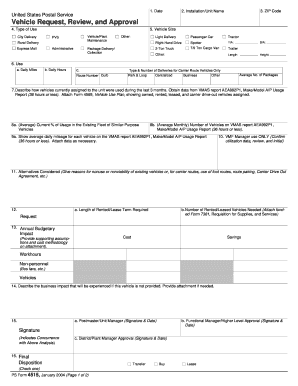
Filling out the PS Form 4515 is essential for users seeking to request, review, and obtain approval for vehicles within the United States Postal Service. This guide aims to provide clear, user-friendly instructions to navigate the form effectively, ensuring that all required information is accurately completed.
Follow the steps to complete the PS Form 4515 online.
- Press the ‘Get Form’ button to access the PS Form 4515 and open it in the desired editing application.
- In the 'Date' field, enter the current date when you are filling out the form.
- Insert the 'Installation/Unit Name' in the designated field. This should reflect the specific postal unit for which the request is being made.
- Select the 'Type of Use' from the provided options, including City Delivery, Rural Delivery, Administrative, and others. Ensure the choice reflects the intended use for the vehicle.
- Specify the 'Vehicle Size' needed for the request by selecting from the options provided, such as Light Delivery, 2-Ton Truck, or Trailer.
- Complete the 'Use' section by filling in the average daily miles, daily hours, and route number, if applicable. For carrier route vehicles only, indicate the curb type and number of deliveries.
- Explain how vehicles currently assigned to the unit have been utilized over the past three months. Refer to VMAS report AEA992P1, including details from the Vehicle Use Plan (Form 4569) that must be attached.
- In the section regarding the current percentage of usage, fill in both average usage in the existing fleet and the average number of vehicles on the VMAS report.
- Provide the average daily mileage for each vehicle as shown in the VMAS report, and attach any necessary data to support this information.
- The VMF Manager will use the form to confirm utilization data, and they must review and initial at the designated space.
- Describe any alternatives that were considered and provide justification for not using existing vehicles or other routes.
- Indicate the length of the rental or lease term required, the number of vehicles needed, and ensure the funded Form 7381 is attached.
- Document the annual budgetary impact, including estimated costs and potential savings related to this vehicle request.
- Clearly describe the business impact that would occur if this vehicle is not provided, attaching any additional information if necessary.
- Obtain the appropriate signatures from the Postmaster, Functional Manager, and District/Plant Manager in their respective sections to finalize approval.
- Review the completed form thoroughly. Users may then save changes, download, print, or share the form as needed.
Complete the PS Form 4515 online to ensure timely processing of your vehicle request.
Industry-leading security and compliance
US Legal Forms protects your data by complying with industry-specific security standards.
-
In businnes since 199725+ years providing professional legal documents.
-
Accredited businessGuarantees that a business meets BBB accreditation standards in the US and Canada.
-
Secured by BraintreeValidated Level 1 PCI DSS compliant payment gateway that accepts most major credit and debit card brands from across the globe.