Loading
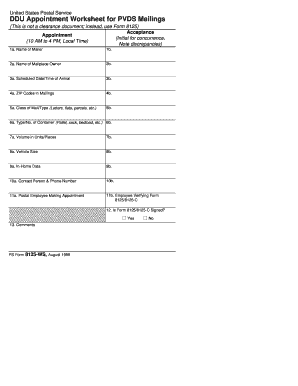
Get Ps 8125ws, Ddu Appointment Worksheet For ... - Nalc Branch 78 - Nalc-branch78
How it works
-

Open form follow the instructions
-

Easily sign the form with your finger
-

Send filled & signed form or save
How to fill out the PS 8125WS, DDU Appointment Worksheet for NALC Branch 78 online
The PS 8125WS, DDU Appointment Worksheet is essential for managing drop ship appointments for destination rate mailings. This guide provides step-by-step instructions to help users accurately complete the form online, ensuring a smooth appointment process.
Follow the steps to complete the PS 8125WS form effectively.
- Press the ‘Get Form’ button to access the PS 8125WS, DDU Appointment Worksheet and open it in the provided editor.
- In the '1a. Name of Mailer' field, enter the full name of the mailer who is sending the mailing.
- For '1b.', leave this field blank if no additional information is necessary.
- In the '2a. Name of Mailpiece Owner' field, input the name of the individual or organization that owns the mailpieces.
- Complete '2b.' only if there is extra relevant information to add.
- Fill in '3a. Scheduled Date/Time of Arrival' with the expected arrival date and time, noting the time must be within local hours (10 AM to 4 PM).
- For '3b.', this field may remain blank unless further instructions are provided.
- In '4a. ZIP Codes in Mailings', list the relevant ZIP codes associated with the mailing.
- Provide appropriate ZIP codes in '4b.' if additional information is needed.
- Specify the mail class in '5a. Class of Mail/Type', indicating whether the mailing consists of letters, flats, parcels, etc.
- Use '5b.' for any supplementary information regarding the class of mail.
- Indicate the type and number of containers in '6a. Type/No. of Container' (e.g., pallet, sack, bedload).
- Provide clarifying details in '6b.' if necessary.
- Record the volume of mail in units or pieces in '7a. Volume in Units/Pieces'.
- Optional details can be included in '7b.' if applicable.
- In '8a. Vehicle Size', specify the size of the vehicle that will be used for delivery.
- Provide additional size information if needed in '8b.'.
- In '9a. In-Home Data', include any relevant data related to the mailing.
- Fill '9b.' with additional in-home data if applicable.
- List the '10a. Contact Person & Phone Number' of someone who can provide further information.
- Fill in '10b.' if there is a need for supplementary contact information.
- In '11a. Postal Employee Making Appointment', the postal employee should enter their name.
- In '11b. Employee Verifying Form', the name of the employee who confirms the details must be entered.
- Complete question '12.' by indicating whether Form 8125/8125-C has been signed with 'Yes' or 'No'.
- Use '13. Comments' to provide any additional relevant comments.
- Review all entries for accuracy and completeness before saving or finalizing the form.
- Once completed, users can download, print, or share the form as needed.
Complete your PS 8125WS form online today for efficient mail management.
Industry-leading security and compliance
US Legal Forms protects your data by complying with industry-specific security standards.
-
In businnes since 199725+ years providing professional legal documents.
-
Accredited businessGuarantees that a business meets BBB accreditation standards in the US and Canada.
-
Secured by BraintreeValidated Level 1 PCI DSS compliant payment gateway that accepts most major credit and debit card brands from across the globe.