Loading
Get Parents Potel
How it works
-

Open form follow the instructions
-

Easily sign the form with your finger
-

Send filled & signed form or save
How to fill out the Parents Potel online
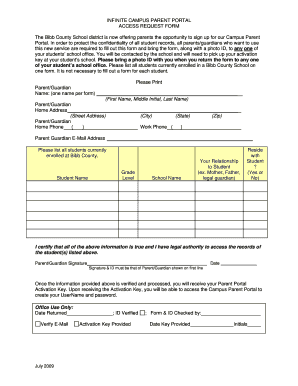
Filling out the Parents Potel is an essential step for parents and guardians wishing to access their student's records through the Campus Parent Portal. This guide will provide you with clear and user-friendly instructions on each section of the form, ensuring a seamless experience as you complete it online.
Follow the steps to complete the Parents Potel accurately.
- Click the 'Get Form' button to access the Parents Potel and open it in your browser for editing.
- Begin by entering the name of the parent or guardian in the designated field. Make sure to provide the first name, middle initial, and last name accurately.
- Next, fill in the home address, including street address, city, state, and zip code. Ensure that all parts of the address are correct for proper identification.
- Provide a contact telephone number in the home and work phone fields. Confirm that the number is a working one where you can be reached for communication related to the portal.
- Enter a valid email address for the parent or guardian. This will be important for receiving confirmation and other correspondence.
- List all students currently enrolled at Bibb County Schools. For each student, provide their name, grade level, school name, your relationship to the student, and indicate whether you reside with the student by selecting 'Yes' or 'No' as applicable.
- Review all the information you have entered for accuracy. It is crucial that the information is correct.
- Sign the form, certifying that all information provided is true and that you have the legal authority to access the records of the student(s) listed. Also, include the date of signing.
- After completing the form, prepare to deliver it to your student's school office along with a photo ID for verification purposes.
- Once your form is verified, you will receive an activation key, which you will use to access the Campus Parent Portal and create your username and password.
Start completing your Parents Potel online today to gain access to the resources you need.
These PIN codes will be sent in the mail to parents with existing accounts or can be obtained at the office of each child's school of attendance. A separate PIN will be required for each student linked to each parent account.