Loading
Form preview
  • US Legal Forms
  • Other Templates
  • More Forms
  • More Uncategorized Forms
  • Ppf Deposit Form - India Post - Indiapost Gov

Get Ppf Deposit Form - India Post - Indiapost Gov

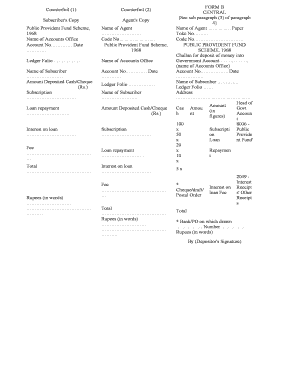
Counterfoil (1) Counterfoil (2) Subscriber's Copy Agent's Copy Public Provident Fund Scheme, 1968 Name of Accounts Office Account No????. Date ???? Name of Agent ???????? Code No???????. Public Provident.

How it works

  1. Open form

    Open form follow the instructions

  2. Easily sign form

    Easily sign the form with your finger

  3. Share form

    Send filled & signed form or save

How to fill out the PPF Deposit Form - India Post - Indiapost Gov online

Filling out the PPF Deposit Form is an essential step in contributing to your Public Provident Fund account. This guide will provide you with a clear and supportive approach to complete the form accurately, ensuring a smooth online process.

Follow the steps to complete your PPF Deposit Form online.

  1. Press the ‘Get Form’ button to access the PPF Deposit Form and open it in the editor.
  2. Enter your name in the 'Name of Subscriber' field exactly as it appears in your identification documents to ensure accuracy.
  3. Fill in your account number in the designated section to link your deposit to your specific PPF account.
  4. Record the date of the deposit in the provided field to keep track of your transaction timeline.
  5. Indicate the amount being deposited in the 'Amount Deposited' section, specifying whether the payment is made via cash or cheque.
  6. If applicable, complete details under 'Loan repayment' and 'Interest on loan' to reflect any loan transactions related to your PPF account.
  7. Verify your entries for accuracy; check all amounts and personal information to avoid any discrepancies.
  8. Once completed, save any changes you have made, then download, print, or share the form as needed for your records.

Complete your PPF Deposit Form online today to secure your financial future.

Get form

Experience a faster way to fill out and sign forms on the web. Access the most extensive library of templates available.
Get form

Related content

Identifying Factors influencing preference towards...
schemes of Post office and factors that motivates them to choose a...
Learn more
Five Star Village Scheme: What is the Post Office...
Nov 26, 2020 — Post Office Five Star Village Yojana - Indian Postal Department has...
Learn more

Related links form

Application For Employment - Butler Machinery Company Download The Donation Request Form - Butler Machinery Company Registration Form And Waiver Of Liability - Michigan Womyn's Music ... Download The Shuttle Reservation Form - Michigan Womyn's Music ...

Questions & Answers

Get answers to your most pressing questions about US Legal Forms API.

Contact support

What is my customer ID? Customer ID is the CIF ID printed on the first page of your Passbook. 6. What should be done once I receive an SMS alert regarding DOP Internet Banking activation? Open the DOP Internet banking page using the URL mentioned in the SMS and use the hyperlink "New User Activation".

If you want to deposit money in your PPF account, then click on Provident Fund. Enter your PPF Account Number and DOP Customer ID. Mention the amount that needs to be deposited and click on the 'Pay' option. IPPB will then notify you for successful payment transfer made through IPPB mobile application.

Post Office Online Saver is open to anyone aged 18 or over and a UK resident for tax purposes. Usually we can open your account quickly but you might be asked to provide ID and some documentation.

How to open a Post Office Savings Account? Download the application and KYC form (link given above) and duly fill the same. Submit these forms along with the documents mentioned above along with Rs. ... After successful completion of the above steps, the savings account will be opened in 2 business days.

You can apply for an account in branch or by post. You manage your account in branch, by phone, post or online. Minimum balance to open the account is £100. The maximum balance of the account is £1 million.

The documents required to open a post office savings account are as follows: Identity proof: Aadhaar card, ration card, passport, driving licence, etc. Address proof: Passport, PAN card, electricity bill, ration card, etc. Recent passport size photographs.

(i) Account can be opened by cash/cheque and in case of cheque the date of deposit shall be date of clearance of cheque.

Anyone above the age of 18 years, having Aadhaar and PAN card, can open this account. The account can be opened instantly from the comfort of your home, which means banking anytime, anywhere.

Get This Form Now!

Use professional pre-built templates to fill in and sign documents online faster. Get access to thousands of forms.
Get form
If you believe that this page should be taken down, please follow our DMCA take down processhere.
Get PPF Deposit Form - India Post - Indiapost Gov
Get form
  • Adoption
  • Bankruptcy
  • Contractors
  • Divorce
  • Home Sales
  • Employment
  • Identity Theft
  • Incorporation
  • Landlord Tenant
  • Living Trust
  • Name Change
  • Personal Planning
  • Small Business
  • Wills & Estates
  • Packages A-Z
  • Affidavits
  • Bankruptcy
  • Bill of Sale
  • Corporate - LLC
  • Divorce
  • Employment
  • Identity Theft
  • Internet Technology
  • Landlord Tenant
  • Living Wills
  • Name Change
  • Power of Attorney
  • Real Estate
  • Small Estates
  • Wills
  • All Forms
  • Forms A-Z
  • Other Templates
  • Legal Hub
  • About Us
  • Help Portal
  • Legal Resources
  • Blog
  • Affiliates
  • Contact Us
  • Delete My Account
  • Site Map
  • Industries
  • Forms in Spanish
  • Localized Forms
  • State-specific Forms
  • Forms Kit
  • Real Estate Handbook
  • All Guides
  • Notarize
  • Incorporation services
  • For Consumers
  • For Small Business
  • For Attorneys
  • USLegal
  • FormsPass
  • pdfFiller
  • signNow
  • altaFlow
  • DocHub
  • Instapage
Form Packages
  • Adoption
  • Bankruptcy
  • Contractors
  • Divorce
  • Home Sales
  • Employment
  • Identity Theft
  • Incorporation
  • Landlord Tenant
  • Living Trust
  • Name Change
  • Personal Planning
  • Small Business
  • Wills & Estates
  • Packages A-Z
Form Categories
  • Affidavits
  • Bankruptcy
  • Bill of Sale
  • Corporate - LLC
  • Divorce
  • Employment
  • Identity Theft
  • Internet Technology
  • Landlord Tenant
  • Living Wills
  • Name Change
  • Power of Attorney
  • Real Estate
  • Small Estates
  • Wills
  • All Forms
  • Forms A-Z
  • Other Templates
Customer Service
  • Legal Hub
  • About Us
  • Help Portal
  • Legal Resources
  • Blog
  • Affiliates
  • Contact Us
  • Delete My Account
  • Site Map
  • Industries
  • Forms in Spanish
  • Localized Forms
  • State-specific Forms
  • Forms Kit
Legal Guides
  • Real Estate Handbook
  • All Guides
Prepared for you
  • Notarize
  • Incorporation services
Our Customers
  • For Consumers
  • For Small Business
  • For Attorneys
Our Sites
  • USLegal
  • FormsPass
  • pdfFiller
  • signNow
  • altaFlow
  • DocHub
  • Instapage
Social Media
Call us now toll free:
+1 833 426 79 33
As seen in:
© Copyright 1999-2026 airSlate Legal Forms, Inc. 17 Station Street, Suite 303, Brookline, MA 02445
  • Your Privacy Choices
  • Terms of Service
  • Privacy Notice
  • Content Takedown Policy
  • Bug Bounty Program