Loading
Get Plan 3 Payment Advice. Plan 3 Payment Advice Form - Drs Wa
How it works
-

Open form follow the instructions
-

Easily sign the form with your finger
-

Send filled & signed form or save
How to fill out the Plan 3 Payment Advice Form - Drs Wa online
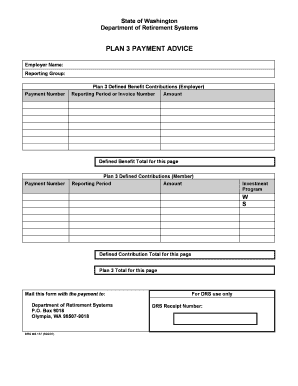
This guide provides clear, step-by-step instructions on how to accurately complete the Plan 3 Payment Advice Form. Whether you are familiar with retirement systems or new to the process, this information aims to support your completion of the form seamlessly.
Follow the steps to expertly complete the Plan 3 Payment Advice form.
- Press the ‘Get Form’ button to access the Plan 3 Payment Advice Form as needed.
- In the 'Employer Name' field, enter your organization's name exactly as it appears on your Statement of Account Activity.
- Next, in the 'Reporting Group' section, input your unique DRS Reporting Group number, such as 311003. Ensure you provide a separate form for each Reporting Group if applicable.
- For the 'Payment Number' field, enter the number of the payment document you are using, such as a check or journal voucher. Each invoice number or reporting period must have a corresponding payment document number listed.
- Fill in the 'Reporting Period or Invoice Number' with the relevant invoice number or date. For transactions, include the reporting period (e.g., 10/06 for October 2006). For invoices, reference the specific 8-digit invoice number shown on the document.
- Enter the 'Amount' you wish to apply to the specific invoice or reporting period. If you are making contributions to a Defined Contribution plan, enter the amounts beside the appropriate investment programs (W for Washington State Investment Board and S for Self-Directed Investment Program).
- In the 'Defined Benefit Total for this page' section, indicate the total amount being contributed for the Defined Benefit portion, which reflects employer contributions.
- Similarly, in the 'Defined Contribution Total for this page', enter the total for the Defined Contribution portion, representing member contributions.
- Finally, complete the 'Plan 3 Total for this page' by summing up both the Defined Benefit and Defined Contribution totals. If you are utilizing multiple pages, ensure each page is totaled separately.
- After completing the form, review your entries for accuracy. You can then save your changes, download a copy for your records, print the form, or share it as needed.
Complete your Plan 3 Payment Advice Form online today to ensure timely processing of your contributions.
PERS Plan 3 members are eligible to retire at age 65 if they are vested.