Loading
Form preview
  • US Legal Forms
  • Form Library
  • More Forms
  • More Uncategorized Forms
  • Request To Withdraw From A Part-time Studies Course Form - Bcit - Bcit

Get Request To Withdraw From A Part-time Studies Course Form - Bcit - Bcit

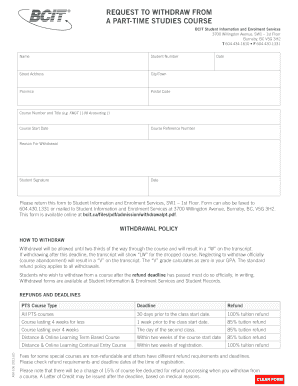
This form is available online at bcit. ca/files/pdf/admission/withdrawalpt. pdf. WITHDRAWAL POLICY HOW TO WITHDRAW Withdrawal will be allowed until two-thirds of the way through the course and will result in a W on the transcript. REQUEST TO WITHDRAW FROM A PART-TIME STUDIES COURSE BCIT Student Information and Enrolment Services 3700 Willingdon Avenue SW1 1st Floor Burnaby BC V5G 3H2 T 604. 434. 1610 F 604. 430. 1331 Name Student Number Street .

How it works

  1. Open form

    Open form follow the instructions

  2. Easily sign form

    Easily sign the form with your finger

  3. Share form

    Send filled & signed form or save

How to fill out the Request To Withdraw From A Part-time Studies Course Form - BCIT - Bcit online

Withdrawing from a part-time studies course can be a significant decision for any student. This guide provides you with a clear and supportive step-by-step process to successfully complete the Request To Withdraw From A Part-time Studies Course Form at BCIT online.

Follow the steps to accurately complete your withdrawal form.

  1. Press the ‘Get Form’ button to access the Request To Withdraw From A Part-time Studies Course Form online.
  2. Begin filling out the 'Name' field. Enter your full legal name as it appears on your student identification.
  3. In the 'Student Number' field, provide your unique student identification number issued by BCIT.
  4. Fill out your 'Street Address,' ensuring to include details like apartment or unit numbers if applicable.
  5. Input your 'City/Town,' followed by the 'Province' and 'Postal Code' to specify your residence.
  6. Enter the 'Date' on which you are completing the form. This should reflect the current date.
  7. In the 'Course Number and Title' section, specify the course you wish to withdraw from, including the course code (e.g., FMGT 1100 Accounting 1).
  8. Provide the 'Course Start Date' to indicate when the class began.
  9. Include the 'Course Reference Number' assigned to your course for identification purposes.
  10. Select and state your 'Reason For Withdrawal' from the provided options or provide a brief explanation.
  11. Sign and date the form where indicated. Your signature acknowledges your request to withdraw officially.
  12. Once you have completed the form, you can save changes, download, print, or share the form as needed.

Complete your withdrawal form online today to ensure a smooth process.

Get form

Experience a faster way to fill out and sign forms on the web. Access the most extensive library of templates available.
Get form

Related content

Transfer Policies for Students with Stale-Dated...
or courses students can take; students enrolling in part-time rather than full-time...
Learn more
First Year Guide - Barnard College
Links to detailed information online on how to sign up for courses and which courses...
Learn more
Business Education: Content Knowledge - ETS
and how much time you have before test day. ... specialization, including specific...
Learn more

Related links form

METROPOLITAN SWIMMING, INC - TeamUnify Quad To Serial Small Form Factor Pluggable Adapter - Mellanox Wolf Point Basketball Tournament Butte Invitational 5 On 5 Basketball Tournament

Questions & Answers

Get answers to your most pressing questions about US Legal Forms API.

Contact support

For question about Awards, Scholarships and Bursaries, email us at sawards@bcit.ca. For any other Financial Aid questions, email us at finaid@bcit.ca.

Please call 604-434-1610 or toll-free at 1-866-434-1610 (Canada & United States only).

Students who withdraw or transfer 31 days prior to the course start date will receive a 100 percent tuition refund, and there is no charge to transfer.

NAIT supports our students in all their educational pursuits, including the opportunity for program transfer. Students who need to withdraw from their credit program on or after the start of their first class must complete a Program Withdrawl form with their Program Leader and submit it to the Office of the Registrar.

How Do I...Withdraw from a Course? (W Policy) Students must formally request to apply the W Grade option to a course by the last day of classes of each term. ... Courses with the new grade mode of "W" will appear on the transcript with a "W" grade, but will not count in the GPA hours nor in any GPA calculations.

Notify Student Records immediately by phone at 604-432-8353 or by email at records@bcit.ca.

Please call 604-434-1610 or toll-free at 1-866-434-1610 (Canada & United States only).

Need support with an existing application? Are you a current BCIT student or alumni? Students in the ISEP program may also email: isep.support@bcit.ca.

Get This Form Now!

Use professional pre-built templates to fill in and sign documents online faster. Get access to thousands of forms.
Get form
If you believe that this page should be taken down, please follow our DMCA take down processhere.
Get Request To Withdraw From A Part-time Studies Course Form - BCIT - Bcit
Get form
  • Adoption
  • Bankruptcy
  • Contractors
  • Divorce
  • Home Sales
  • Employment
  • Identity Theft
  • Incorporation
  • Landlord Tenant
  • Living Trust
  • Name Change
  • Personal Planning
  • Small Business
  • Wills & Estates
  • Packages A-Z
  • Affidavits
  • Bankruptcy
  • Bill of Sale
  • Corporate - LLC
  • Divorce
  • Employment
  • Identity Theft
  • Internet Technology
  • Landlord Tenant
  • Living Wills
  • Name Change
  • Power of Attorney
  • Real Estate
  • Small Estates
  • Wills
  • All Forms
  • Forms A-Z
  • Form Library
  • Legal Hub
  • About Us
  • Help Portal
  • Legal Resources
  • Blog
  • Affiliates
  • Contact Us
  • Delete My Account
  • Site Map
  • Industries
  • Forms in Spanish
  • Localized Forms
  • State-specific Forms
  • Forms Kit
  • Real Estate Handbook
  • All Guides
  • Notarize
  • Incorporation services
  • For Consumers
  • For Small Business
  • For Attorneys
  • USLegal
  • FormsPass
  • pdfFiller
  • signNow
  • altaFlow
  • DocHub
  • Instapage
Form Packages
  • Adoption
  • Bankruptcy
  • Contractors
  • Divorce
  • Home Sales
  • Employment
  • Identity Theft
  • Incorporation
  • Landlord Tenant
  • Living Trust
  • Name Change
  • Personal Planning
  • Small Business
  • Wills & Estates
  • Packages A-Z
Form Categories
  • Affidavits
  • Bankruptcy
  • Bill of Sale
  • Corporate - LLC
  • Divorce
  • Employment
  • Identity Theft
  • Internet Technology
  • Landlord Tenant
  • Living Wills
  • Name Change
  • Power of Attorney
  • Real Estate
  • Small Estates
  • Wills
  • All Forms
  • Forms A-Z
  • Form Library
Customer Service
  • Legal Hub
  • About Us
  • Help Portal
  • Legal Resources
  • Blog
  • Affiliates
  • Contact Us
  • Delete My Account
  • Site Map
  • Industries
  • Forms in Spanish
  • Localized Forms
  • State-specific Forms
  • Forms Kit
Legal Guides
  • Real Estate Handbook
  • All Guides
Prepared for you
  • Notarize
  • Incorporation services
Our Customers
  • For Consumers
  • For Small Business
  • For Attorneys
Our Sites
  • USLegal
  • FormsPass
  • pdfFiller
  • signNow
  • altaFlow
  • DocHub
  • Instapage
Social Media
Call us now toll free:
+1 833 426 79 33
As seen in:
© Copyright 1999-2026 airSlate Legal Forms, Inc. 3720 Flowood Dr, Flowood, Mississippi 39232
  • Your Privacy Choices
  • Terms of Service
  • Privacy Notice
  • Content Takedown Policy
  • Bug Bounty Program