Loading
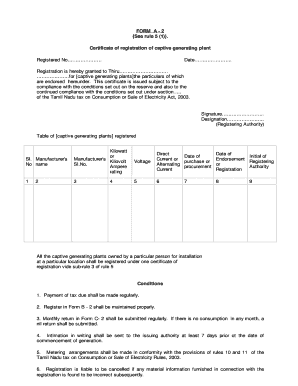
Get Form A - 2 See Rule 5 (1) . Certificate Of Registration Of Captive ...
How it works
-

Open form follow the instructions
-

Easily sign the form with your finger
-

Send filled & signed form or save
How to fill out the FORM A - 2 See Rule 5 (1) . Certificate Of Registration Of Captive Generating Plant online
This guide provides comprehensive instructions on how to successfully complete the FORM A - 2 See Rule 5 (1) . Certificate Of Registration Of Captive Generating Plant online. Whether you are a first-time user or already familiar with the process, this guide will clarify each step needed.
Follow the steps to complete the registration form accurately.
- Press the ‘Get Form’ button to access the form. Once you have done this, the form will open in your preferred digital editor.
- In the designated areas, enter the registered number and date. Ensure accuracy as this information is crucial for your certificate.
- Complete the section titled 'Registration is hereby granted to'. Input the name of the applicant in the format Thiru [Name]. This identifies the individual or entity to whom the certificate is issued.
- Fill in the particulars of the captive generating plants as instructed in the table. Include the manufacturer's name, kilowatt or kilovolt rating, and details on the type of current (direct or alternating).
- Document the dates related to the purchase or procurement of the plants, ensuring the information aligns with any relevant purchase agreements or contracts.
- Ensure the initial of the registering authority is included in the specified area, alongside the date of registration. This confirms the approval of your form.
- Review the conditions outlined at the end of the form carefully. Confirm that you understand and agree to the conditions regarding tax payments, registration, and reporting obligations.
- Once all fields are accurately filled, review your information to ensure completeness and correctness. Save your changes as necessary.
- After saving, you can download, print, or share the completed form as a digital file for your records or submission.
Begin filling out your FORM A - 2 online today to ensure smooth registration of your captive generating plant.
FITRADIO is licensed to provide a music service for businesses. Personal version comes with 35 hours, Coach PRO comes with 75 hours. Both tiers will limit usage after you hit your limit to 1 hour per day.
Industry-leading security and compliance
US Legal Forms protects your data by complying with industry-specific security standards.
-
In businnes since 199725+ years providing professional legal documents.
-
Accredited businessGuarantees that a business meets BBB accreditation standards in the US and Canada.
-
Secured by BraintreeValidated Level 1 PCI DSS compliant payment gateway that accepts most major credit and debit card brands from across the globe.