Loading
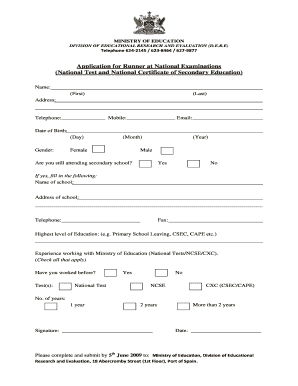
Get Application Form For Runner - Ministry Of Education
How it works
-

Open form follow the instructions
-

Easily sign the form with your finger
-

Send filled & signed form or save
How to fill out the Application Form For Runner - Ministry Of Education online
This guide provides clear and detailed instructions for completing the Application Form For Runner with the Ministry of Education online. Follow these steps to ensure your application is filled out correctly and submitted on time.
Follow the steps to complete your application form successfully.
- Click ‘Get Form’ button to obtain the form and open it in the editor.
- Begin by entering your name in the designated fields for first and last name. Ensure that the spelling is accurate.
- Provide your address in the specified format. Include your complete street address, city, and postal code.
- Enter your telephone and mobile numbers in the corresponding fields. Check that each number is accurate.
- Fill in your email address. Ensure it is a valid address as it may be used for communication.
- Indicate your date of birth by selecting the day, month, and year from the provided options.
- Select your gender by marking the appropriate choice.
- Respond to the question about whether you are still attending secondary school by selecting 'Yes' or 'No'.
- If you answered 'Yes', provide the name and address of your school, along with the school's fax and telephone number.
- Indicate your highest level of education achieved, such as Primary School Leaving, CSEC, or CAPE.
- Detail your experience working with the Ministry of Education by checking all applicable tests you have worked on (National Test, NCSE, CXC).
- Select the number of years you have experience, checking one of the given options: 1 year, 2 years, or more than 2 years.
- Sign the form in the designated signature area and include the date of signing.
- Once all fields are completed, save your changes, and prepare to download, print, or share the completed form as required.
Complete your application form online today and take the first step towards your role with the Ministry of Education.
What's This Settlement About? A $58 Million Settlement has been paid out to users and customers of Plaid Inc. (“Plaid”). Consumers are reporting $35.97 payments in their inboxes, PayPal accounts and Venmo statements.
Industry-leading security and compliance
US Legal Forms protects your data by complying with industry-specific security standards.
-
In businnes since 199725+ years providing professional legal documents.
-
Accredited businessGuarantees that a business meets BBB accreditation standards in the US and Canada.
-
Secured by BraintreeValidated Level 1 PCI DSS compliant payment gateway that accepts most major credit and debit card brands from across the globe.