Loading
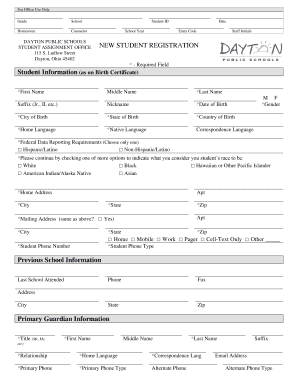
Get Student Registration Fill-in Form - Dayton Public Schools - Dom2-public Dps K12 Oh
How it works
-

Open form follow the instructions
-

Easily sign the form with your finger
-

Send filled & signed form or save
How to fill out the Student Registration Fill-In Form - Dayton Public Schools - Dom2-public Dps K12 Oh online
Completing the Student Registration Fill-In Form for Dayton Public Schools is an essential step in enrolling your child in school. This guide will provide you with detailed instructions to help you navigate the online form efficiently.
Follow the steps to fill out the student registration form correctly.
- Click the ‘Get Form’ button to obtain the form. This will open the document, allowing you to start filling it out.
- Begin with the ‘Student Information’ section. Enter the required fields, including the first name, middle name, last name, date of birth, city of birth, state of birth, country of birth, home language, and native language. Ensure that the information matches the details on the student’s birth certificate.
- Fill out the ‘Gender’ and ‘Federal Data Reporting Requirements’ sections by selecting the appropriate options. It is important to choose one option from the provided classifications for accurate data reporting.
- Provide the ‘Home Address’ details, including the street address, apartment number, city, state, and zip code. If the mailing address is the same as the home address, indicate so by checking the appropriate box.
- Under ‘Previous School Information,’ input the last school attended by the student, along with relevant contact information such as phone number, fax number, address, city, state, and zip code.
- In the ‘Primary Guardian Information’ section, complete the required fields for the guardian’s title, first name, middle name, last name, relationship to the student, home language, primary phone, and email address.
- If applicable, fill out the ‘Secondary Guardian Information.’ This is optional but helpful for providing additional contact details.
- For the ‘Emergency Contact/Pick-up Authorization’ section, provide the name, relationship to the student, and contact information of an emergency contact.
- Complete the permission sections by checking either ‘Yes’ or ‘No’ for participation in field trips and media recording. Make sure to sign and date the form at the bottom, certifying the accuracy of the information provided.
- Once all sections of the form are completed, you can save your changes. You will then have the option to download, print, or share the form as needed.
Begin filling out the Student Registration Fill-In Form online today to ensure your child's enrollment in Dayton Public Schools.
Dayton Public Schools | Dayton Public Schools (DPS) is an urban district of 14,000 students in preschool through high school.
Industry-leading security and compliance
US Legal Forms protects your data by complying with industry-specific security standards.
-
In businnes since 199725+ years providing professional legal documents.
-
Accredited businessGuarantees that a business meets BBB accreditation standards in the US and Canada.
-
Secured by BraintreeValidated Level 1 PCI DSS compliant payment gateway that accepts most major credit and debit card brands from across the globe.