Loading
Get Rp5 Forms
How it works
-

Open form follow the instructions
-

Easily sign the form with your finger
-

Send filled & signed form or save
How to fill out the Rp5 Forms online
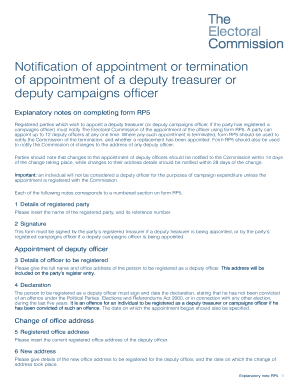
The Rp5 Form is essential for registered parties to notify The Electoral Commission about the appointment or termination of deputy treasurers or deputy campaigns officers. This guide provides clear, step-by-step instructions for filling out the form online, ensuring compliance with legal requirements.
Follow the steps to complete the Rp5 Forms online
- Click ‘Get Form’ button to obtain the form and open it in the editor.
- In the first section, 'Details of registered party,' enter the name of the registered party and its reference number.
- For the 'Signature' section, this form must be signed by the party’s registered treasurer if appointing a deputy treasurer, or by the party’s registered campaigns officer if appointing a deputy campaigns officer.
- In 'Details of officer to be registered,' provide the full name and office address of the person being registered as a deputy officer. This address will be included on the official register.
- In the 'Declaration' section, the individual must sign and date the declaration, confirming they have not been convicted of any relevant offences in the past five years. Specify the date on which the appointment began.
- If changing the office address, include the current registered office address in the specified section.
- Provide details of the new office address for the deputy officer and the date on which this change took place.
- When terminating an appointment, fill in the details of the officer being removed from the register, including their name and the date when their appointment ended.
- Finally, review all entered information for accuracy. You can then save changes, download, print, or share the completed form as needed.
Complete your Rp5 Forms online to ensure compliance and proper documentation.
Fax machines will automatically retry calls in case the receiving end fails to answer. It is easy to adjust the number of times the machine redials by just checking your machine.
Industry-leading security and compliance
US Legal Forms protects your data by complying with industry-specific security standards.
-
In businnes since 199725+ years providing professional legal documents.
-
Accredited businessGuarantees that a business meets BBB accreditation standards in the US and Canada.
-
Secured by BraintreeValidated Level 1 PCI DSS compliant payment gateway that accepts most major credit and debit card brands from across the globe.