We use cookies to improve security, personalize the user experience, enhance our marketing activities (including cooperating with our marketing partners) and for other business use.
Click "here" to read our Cookie Policy. By clicking "Accept" you agree to the use of cookies. Read less
Read more
Accept
Loading
Form preview
  • US Legal Forms
  • Form Library
  • More Forms
  • More Uncategorized Forms
  • Form 9 - Government Of Nova Scotia - Gov Ns

Get Form 9 - Government Of Nova Scotia - Gov Ns

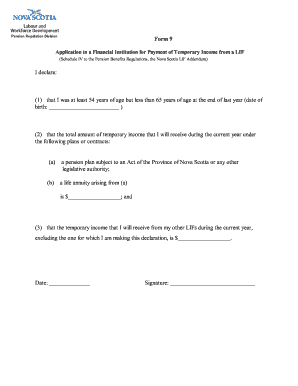
Form 9 Application to a Financial Institution for Payment of Temporary Income from a LIF (Schedule IV to the Pension Benefits Regulations, the Nova Scotia LIF Addendum) I declare: (1) that I was at.

How it works

  1. Open form

    Open form follow the instructions

  2. Easily sign form

    Easily sign the form with your finger

  3. Share form

    Send filled & signed form or save

How to fill out the Form 9 - Government Of Nova Scotia - Gov Ns online

Filling out Form 9 is an essential step in applying for temporary income from a Life Income Fund (LIF) in Nova Scotia. This guide will provide you with clear, step-by-step instructions to help you complete the form accurately and efficiently.

Follow the steps to successfully complete the Form 9 application.

  1. Click ‘Get Form’ button to obtain the form and open it in the editor.
  2. Enter your date of birth in the designated field, ensuring that you meet the age requirement of being at least 54 years old but less than 65 years old at the end of last year.
  3. Provide the total amount of temporary income you will receive during the current year under applicable plans or contracts. This includes any amounts from pension plans subject to Nova Scotia legislation or life annuities arising from those plans.
  4. In the next field, specify the total temporary income expected from any other LIFs during the current year, excluding the one you are declaring for this form.
  5. Fill in the date on which you are completing the form.
  6. Sign the form in the designated signature field to affirm the declarations made.
  7. After completing all fields, you can save your changes, download, print, or share the form according to your needs.

Complete your Form 9 application online for a seamless experience.

Get form

Experience a faster way to fill out and sign forms on the web. Access the most extensive library of templates available.
Get form

Related content

Form F-9 - SEC.gov
Halifax NS B3J 2A8 ... Province of Nova Scotia, Canada ... the Registrant in connection...
Learn more
Positive Aging - Government of Nova Scotia
Published in conventional and electronic form by Communications Nova Scotia. ... Strategy...
Learn more
Black Nova Scotians - Wikipedia
Black Nova Scotians or African Nova Scotians are Black Canadians whose ancestors primarily...
Learn more

Related links form

Withholding Tax Reconciliation - The City Of Brunswick Chemistry 9 - Unit 1 Test (Accelerated) A Printable Readiness Assessment And Physical Activity Waiver. Mansfield Richland County Public Library

Questions & Answers

Get answers to your most pressing questions about US Legal Forms API.

Contact support

The 5 R's of a team charter are Reason, Results, Roles, Rules, and Relationships. A team charter's three essential elements are purpose and objectives, roles and responsibilities, and communication guidelines.

How to Develop a Project Charter Identify the project vision. Identify the stakeholders and the customers. Create an organizational chart. Define project milestones. Create a resource plan. Set the budget for the project. List down the dependencies, constraints, and risks. Lay out the implementation plan.

A project charter should only include three elements: your project objectives, scope, and responsibilities. Once your charter has been approved, you should then create a project plan. Your project plan builds on your project charter to provide a more in-depth blueprint of the key elements of your project.

The most important part of the project charter is the objectives section. It outlines the goals of a project and clarifies what needs to be accomplished. Without a clear understanding of the objectives, it would be difficult to develop an effective plan and ensure that all stakeholders are on board with the project.

What Are the Contents of a Project Charter? A project charter should always include an overview, an outline of scope, an approximate schedule, a budget estimate, anticipated risks, and key stakeholders. Each of these sections should be brief, but as thorough as possible.

7 steps to write a project plan to keep you on track Goals and project objectives. Success metrics. Stakeholders and roles. Scope and budget. Milestones, deliverables, and project dependencies. Timeline and schedule. Communication plan.

A project charter is a formal short document that states a project exists and provides project managers with written authority to begin work. A project charter document describes a project to create a shared understanding of its goals, objectives and resource requirements before the project is scoped out in detail.

Steps to writing a project charter Choose a project name. Identify the purpose, objective (goal), and project specification. Set a budget. Define deliverables. Assess scope and risks. Create a timeframe or milestones. List key stakeholders. Layout team roles and responsibilities.

Get This Form Now!

Use professional pre-built templates to fill in and sign documents online faster. Get access to thousands of forms.
Get form
If you believe that this page should be taken down, please follow our DMCA take down processhere.

Industry-leading security and compliance

US Legal Forms protects your data by complying with industry-specific security standards.
  • In businnes since 1997
    25+ years providing professional legal documents.
  • Accredited business
    Guarantees that a business meets BBB accreditation standards in the US and Canada.
  • Secured by Braintree
    Validated Level 1 PCI DSS compliant payment gateway that accepts most major credit and debit card brands from across the globe.
Get Form 9 - Government Of Nova Scotia - Gov Ns
Get form
Form Packages
Adoption
Bankruptcy
Contractors
Divorce
Home Sales
Employment
Identity Theft
Incorporation
Landlord Tenant
Living Trust
Name Change
Personal Planning
Small Business
Wills & Estates
Packages A-Z
Form Categories
Affidavits
Bankruptcy
Bill of Sale
Corporate - LLC
Divorce
Employment
Identity Theft
Internet Technology
Landlord Tenant
Living Wills
Name Change
Power of Attorney
Real Estate
Small Estates
Wills
All Forms
Forms A-Z
Form Library
Customer Service
Terms of Service
Privacy Notice
Legal Hub
Content Takedown Policy
Bug Bounty Program
About Us
Help Portal
Legal Resources
Blog
Affiliates
Contact Us
Delete My Account
Site Map
Industries
Forms in Spanish
Localized Forms
State-specific Forms
Forms Kit
Legal Guides
Real Estate Handbook
All Guides
Prepared for You
Notarize
Incorporation services
Our Customers
For Consumers
For Small Business
For Attorneys
Our Sites
US Legal Forms
USLegal
FormsPass
pdfFiller
signNow
airSlate WorkFlow
DocHub
Instapage
Social Media
Call us now toll free:
+1 833 426 79 33
As seen in:
  • USA Today logo picture
  • CBC News logo picture
  • LA Times logo picture
  • The Washington Post logo picture
  • AP logo picture
  • Forbes logo picture
© Copyright 1997-2025
airSlate Legal Forms, Inc.
3720 Flowood Dr, Flowood, Mississippi 39232
Form Packages
Adoption
Bankruptcy
Contractors
Divorce
Home Sales
Employment
Identity Theft
Incorporation
Landlord Tenant
Living Trust
Name Change
Personal Planning
Small Business
Wills & Estates
Packages A-Z
Form Categories
Affidavits
Bankruptcy
Bill of Sale
Corporate - LLC
Divorce
Employment
Identity Theft
Internet Technology
Landlord Tenant
Living Wills
Name Change
Power of Attorney
Real Estate
Small Estates
Wills
All Forms
Forms A-Z
Form Library
Customer Service
Terms of Service
Privacy Notice
Legal Hub
Content Takedown Policy
Bug Bounty Program
About Us
Help Portal
Legal Resources
Blog
Affiliates
Contact Us
Delete My Account
Site Map
Industries
Forms in Spanish
Localized Forms
State-specific Forms
Forms Kit
Legal Guides
Real Estate Handbook
All Guides
Prepared for You
Notarize
Incorporation services
Our Customers
For Consumers
For Small Business
For Attorneys
Our Sites
US Legal Forms
USLegal
FormsPass
pdfFiller
signNow
airSlate WorkFlow
DocHub
Instapage
Social Media
Call us now toll free:
+1 833 426 79 33
As seen in:
  • USA Today logo picture
  • CBC News logo picture
  • LA Times logo picture
  • The Washington Post logo picture
  • AP logo picture
  • Forbes logo picture
© Copyright 1997-2025
airSlate Legal Forms, Inc.
3720 Flowood Dr, Flowood, Mississippi 39232