Loading
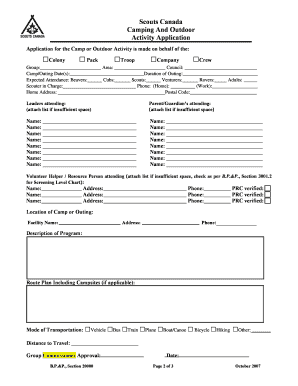
Get Camping And Outdoor Activity Form
How it works
-

Open form follow the instructions
-

Easily sign the form with your finger
-

Send filled & signed form or save
How to fill out the Camping And Outdoor Activity Form online
Filling out the Camping And Outdoor Activity Form online can streamline the planning of your outdoor excursions. This guide will provide you with clear and detailed instructions on each section of the form, ensuring a smooth submission process.
Follow the steps to complete the Camping And Outdoor Activity Form.
- Click ‘Get Form’ button to access the Camping And Outdoor Activity Form and open it for editing.
- Indicate the group by selecting one of the options: Colony, Pack, Troop, Company, or Crew. Fill in the Group name, Council, and provide details for the Camp/Outing Date(s).
- Enter the Expected Attendance, specifying the number for each category: Beavers, Cubs, Scouts, Venturers, Rovers, Adults, and provide the Scouter in Charge information including their Home Address and Phone Numbers.
- List the Leaders, Parents/Guardians, and Volunteer Helpers or Resource Persons attending. If space is insufficient, attach a separate list.
- Provide the Location of Camp or Outing, including the Facility Name, Phone, Address, and a brief Description of the Program.
- Detail the Route Plan and Mode of Transportation for the outing. Indicate the distance to travel.
- Have the Group Commissioner review and approve by signing at the bottom of the form.
- Complete the Safety Checklist, ensuring all necessary conditions are met and signed by the Scouter in Charge.
- Submit the completed application along with all required documentation to the appropriate Administrative Centre.
Complete your Camping And Outdoor Activity Form online today to ensure a successful outing!
Add a column break Open a document in Google Docs. Click the part of the column where you want to add a break. Click Insert Break. Column break.