Loading
Get Application For Ivr Participation - Forms Ssb Gov On
How it works
-

Open form follow the instructions
-

Easily sign the form with your finger
-

Send filled & signed form or save
How to fill out the Application For IVR Participation - Forms Ssb Gov On online
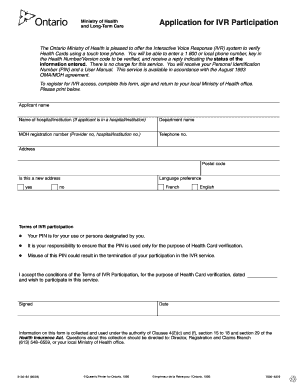
Filling out the Application For IVR Participation is a straightforward process that enables you to access the Interactive Voice Response system for verifying Health Cards. This guide provides clear, step-by-step instructions to help you complete the form accurately and efficiently.
Follow the steps to complete the form online.
- Press the ‘Get Form’ button to obtain the form and open it in the editor.
- Begin by entering the applicant's name in the designated field. Ensure that the name matches the identification documents provided.
- If the applicant is associated with a hospital or institution, fill in the name of the hospital or institution. If not applicable, you can leave this field blank.
- Fill in the department name that the applicant is affiliated with, if applicable.
- Enter the Ministry of Health registration number. This could be the provider number or the hospital/institution number.
- Provide a contact telephone number where you can be reached.
- Input your full address, including the postal code. Ensure the address is accurate to avoid any issues.
- Indicate if this is a new address by checking the appropriate box.
- Select your language preference by marking either French or English.
- Read the terms of IVR participation carefully. Acknowledge that the Personal Identification Number (PIN) provided will be for your use or for users designated by you.
- Sign and date the form to confirm your acceptance of the terms and your intent to participate in the IVR service.
- Finally, save your changes, and download or print the completed form for submission. Ensure that you return the signed form to your local Ministry of Health office.
Complete your Application For IVR Participation online today to access the services you need.
If you want to use a mobile certificate, contact your Finnish mobile provider. See your mobile provider's website and the Mobiilivarmenne web site. for more information on the introduction of a mobile certificate and the charges it includes.