Loading
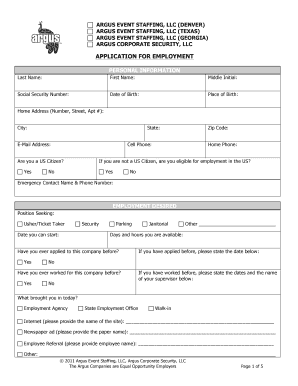
Get Wisconsin Hospital Printable Job Application Form
How it works
-

Open form follow the instructions
-

Easily sign the form with your finger
-

Send filled & signed form or save
How to fill out the Wisconsin Hospital Printable Job Application Form online
This guide provides a step-by-step approach to filling out the Wisconsin Hospital Printable Job Application Form online. By following these instructions, you can ensure that your application is completed accurately and efficiently.
Follow the steps to successfully fill out the job application form.
- Click ‘Get Form’ button to retrieve the Wisconsin Hospital Printable Job Application Form and open it in your preferred editor.
- Begin by entering your personal information. Include your last name, first name, middle initial, and contact details such as your email address and phone numbers.
- Provide additional details including your social security number, date of birth, and your current home address.
- Indicate if you are a U.S. citizen. If not, confirm your eligibility to work in the U.S.
- In the employment desired section, specify the position you are applying for and your available start date.
- List any previous employment or experience you have related to the position, including your job title, company, dates of employment, and responsibilities.
- Give references—provide the names and contact details of individuals who can vouch for your work history.
- Read carefully through any disclosures regarding background checks and the drug-free workplace policies. Sign and date the application to certify the information provided is accurate.
- Once all necessary fields have been filled out, review the form for any errors or omissions before saving your changes.
- After successfully completing the form, save your changes. You can then download, print, or share your application as needed.
Complete your job application online today to take the next step in your career!
Related Definitions date of resolution means the date on which the resolution is signed by, or on behalf of, the last member to sign. All signatures need not be on the same document provided each copy accurately states the terms of the resolution.