Loading
Get Printer Friendly Form (pdf Format) - Guilford County Schools
How it works
-

Open form follow the instructions
-

Easily sign the form with your finger
-

Send filled & signed form or save
How to use or fill out the Printer Friendly Form (pdf Format) - Guilford County Schools online
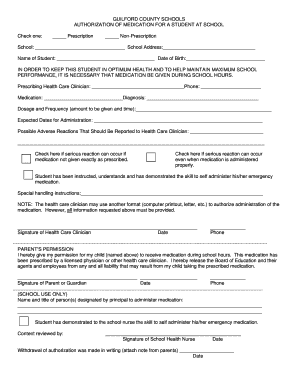
Filling out the Printer Friendly Form is an essential task for ensuring that students receive necessary medication during school hours. This guide will walk you through each section and field of the form, providing clear instructions to help you complete it accurately.
Follow the steps to successfully complete your form.
- Press the ‘Get Form’ button to obtain the form and open it in your preferred editing tool.
- Begin by checking one of the options to indicate whether the medication is a prescription or non-prescription.
- Fill in the school name and address where the student attends.
- Provide the name of the student and their date of birth in the designated fields.
- Input the name of the prescribing health care clinician along with their phone number.
- Write down the name of the medication, the diagnosis it is being administered for, and specify the dosage and frequency in the respective fields.
- Indicate the expected dates for medication administration.
- List any possible adverse reactions that should be reported to the health care clinician.
- If serious reactions can occur either from not administering the medication correctly or from improper administration, check the corresponding boxes.
- Confirm whether the student has been instructed on how to self-administer their emergency medication.
- Provide any special handling instructions if applicable.
- The health care clinician must sign and date the form, along with providing their phone number.
- A parent or guardian must provide their signature, date, and phone number, granting permission for the medication to be administered.
- Complete the school use section by entering the names and titles of those designated by the principal to administer medication.
- The school health nurse will need to sign and date the form after reviewing the content.
- If there is a withdrawal of authorization, ensure it is documented in writing and attach it to the form.
- At the end, save any changes made, and proceed to either download, print, or share the completed form as necessary.
Take action now and complete your documents online to ensure timely medication administration for your student.