Loading
Get Claim Notice - Cuna Mutual Group
How it works
-

Open form follow the instructions
-

Easily sign the form with your finger
-

Send filled & signed form or save
How to fill out the CLAIM NOTICE - CUNA Mutual Group online
This guide provides clear instructions on how to accurately fill out the CLAIM NOTICE form for CUNA Mutual Group online. By following these steps, users can ensure that their claims are submitted correctly and efficiently.
Follow the steps to complete your claim form effectively.
- Press the ‘Get Form’ button to access the CLAIM NOTICE form and open it in your preferred document editor.
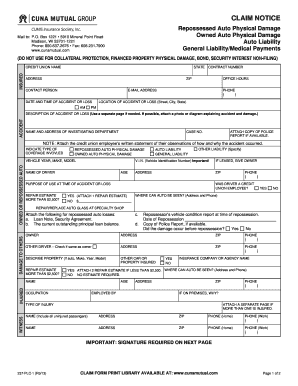
- Begin by filling in the insured section. Include the credit union name, state, address, contract number, and ZIP code. Provide the contact person's name, office hours, email address, and phone number.
- Record the date and time of the accident or loss, specifying both AM and PM. Include the location of the accident or loss with detailed address information.
- Describe the accident or loss fully in the designated section. You may use a separate page if necessary. If available, attach relevant photographs or diagrams that illustrate the damage.
- List the name and address of the investigating department and the associated case number. If a police report is available, attach a copy.
- Indicate the type of coverage involved by selecting the appropriate options: repossessed auto physical damage, owned auto physical damage, or liability coverages.
- Fill in the vehicle information, including year, make, model, and Vehicle Identification Number (VIN). If leased, provide the owner's details, including address and phone number.
- State the purpose of use at the time of the accident or loss and specify if a repair estimate exceeds $2,500. Include the cost of the estimate and attach necessary documentation.
- If applicable, provide information on other drivers involved, their insurance details, and any health injuries sustained. Include multiple names and descriptions if more than one person is affected.
- Conclude by signing the form, printing your name, and including the date. Draw a diagram of the accident if not previously submitted.
- Once completed, save your changes, and choose whether to download, print, or share the form as needed.
Complete your CLAIM NOTICE - CUNA Mutual Group online today to ensure your claim is processed swiftly.
CUNA Mutual Group Announces Plans to Unify Under One Brand in 2023. Company to become TruStage®, reflecting outstanding growth and continuing to improve customer experience.
Industry-leading security and compliance
US Legal Forms protects your data by complying with industry-specific security standards.
-
In businnes since 199725+ years providing professional legal documents.
-
Accredited businessGuarantees that a business meets BBB accreditation standards in the US and Canada.
-
Secured by BraintreeValidated Level 1 PCI DSS compliant payment gateway that accepts most major credit and debit card brands from across the globe.