Loading
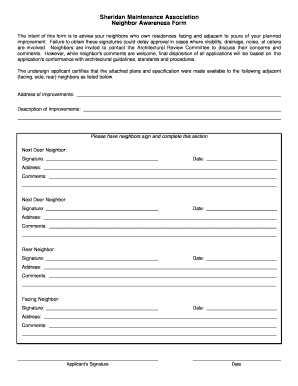
Get Neighbor Awareness Form - Accellpmassoc.com
How it works
-

Open form follow the instructions
-

Easily sign the form with your finger
-

Send filled & signed form or save
How to fill out the Neighbor Awareness Form - Accellpmassoc.com online
The Neighbor Awareness Form is an important document designed to inform neighbors about your planned improvements. Filling this form out correctly ensures a smoother approval process for your project. This guide provides you with detailed instructions to help you navigate the online form with ease.
Follow the steps to complete the Neighbor Awareness Form online.
- Click the ‘Get Form’ button to access the document in an editable format.
- Begin by entering the 'Address of Improvements'. This field requires the specific location where the planned enhancements will occur. Ensure accuracy to facilitate proper identification.
- In the 'Description of Improvements' section, provide a clear and detailed account of the changes you plan to make. Be descriptive to help neighbors understand the scope of your project.
- Have your immediate neighbors sign and complete their sections. There are designated fields for each neighbor: 'Next Door Neighbor', 'Rear Neighbor', and 'Facing Neighbor'. Each section requires: their name, signature, date, address, and any comments they wish to make.
- After all neighbors have signed, the applicant must sign in the 'Applicant's Signature' section, followed by entering the current date.
- Review all entries for accuracy and completeness. Make any necessary adjustments to ensure all information is correct.
- Once you have completed the form, you can choose to save changes, download a copy, print it for your records, or share it with the relevant parties as needed.
Complete your Neighbor Awareness Form online today to ensure neighborly communication and compliance with architectural guidelines.
How to make a PDF editable with Acrobat. Open your PDF file in Acrobat Pro. Click the Edit PDF tool on the right-hand panel. ... Use editing tools to add new text, edit text, or update fonts using selections from the Format drop-down list. Move, add, replace, or resize images using the tools in the Objects list.