Loading
Get Example Change Control Form.pdf - Vmware Communities
How it works
-

Open form follow the instructions
-

Easily sign the form with your finger
-

Send filled & signed form or save
How to fill out the Example Change Control Form.pdf - VMware Communities online
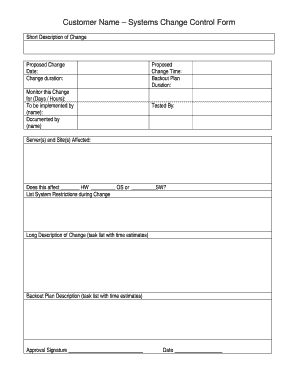
Filling out the Example Change Control Form is a crucial step in documenting system changes effectively. This guide provides you with a clear, step-by-step approach to ensure you complete the form accurately and comprehensively.
Follow the steps to fill out the Example Change Control Form.
- Press the ‘Get Form’ button to access the form and open it in the editor.
- In the ‘Customer Name’ field, enter the name of the customer requesting the change. Be clear and precise.
- Provide a brief description of the change in the ‘Short Description of Change’ section. Keep it concise but informative.
- In the ‘Proposed Change’ field, detail the change you are proposing. Include the date of the proposed change in the designated area.
- Specify the duration of the change in the ‘Change duration’ field. This will help stakeholders understand how long the disruption may last.
- Indicate the monitoring period for this change by specifying the number of days or hours in the designated section.
- Enter the name of the person responsible for implementing the change in the ‘To be implemented by’ section.
- Name the individual who documented the change in the ‘Documented by’ section.
- In the ‘Proposed Change Time’ field, provide an estimate of the time it will take to implement the proposed change.
- Outline the backout plan duration, which indicates how long the backout plan will take if needed.
- In the ‘Tested By’ section, list the individuals who have tested the proposed change for effectiveness and reliability.
- Identify the server(s) and site(s) that will be affected by this change in the designated area.
- Answer the question about whether this change affects hardware, operating system, or software by checking the appropriate boxes.
- List any system restrictions that may occur during the change in the specified section. This is important for stakeholders to know.
- Provide a long description of the change through a task list with estimated times in the designated area.
- Describe the backout plan with a task list and estimated times in the corresponding area.
- Finally, ensure the form is signed. Include the approval signature and date in the provided fields.
- Once all fields have been filled out, you can save your changes, download the completed form, print it, or share it as necessary.
Complete your forms online to ensure efficient and organized change management.
0:30 3:19 The EASY Way To Create Class Name Tags [with Canva ... - YouTube YouTube Start of suggested clip End of suggested clip You'll notice that canva gives you lots of different. Options for name tags that you can use withMoreYou'll notice that canva gives you lots of different. Options for name tags that you can use with your students. I'm going to choose this option. Right over here to the left.
Industry-leading security and compliance
US Legal Forms protects your data by complying with industry-specific security standards.
-
In businnes since 199725+ years providing professional legal documents.
-
Accredited businessGuarantees that a business meets BBB accreditation standards in the US and Canada.
-
Secured by BraintreeValidated Level 1 PCI DSS compliant payment gateway that accepts most major credit and debit card brands from across the globe.