Loading
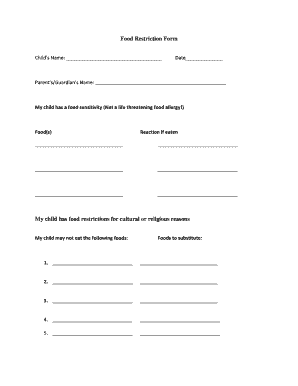
Get Food Restriction Form My Child Has Food Restrictions For Cultural Or ...
How it works
-

Open form follow the instructions
-

Easily sign the form with your finger
-

Send filled & signed form or save
How to use or fill out the Food Restriction Form My Child Has Food Restrictions For Cultural Or ... online
Filling out the Food Restriction Form is an important step in ensuring that your child’s dietary needs are acknowledged and accommodated. This guide provides clear, step-by-step instructions to help you complete the form accurately and efficiently.
Follow the steps to effectively fill out the Food Restriction Form online.
- Click ‘Get Form’ button to obtain the form and open it in your preferred editor.
- Begin by entering your child's name in the space provided at the top of the form. This helps to ensure that the form is directly associated with your child.
- Next, input the date on which you are filling out the form. This will provide a reference for when the information was submitted.
- Proceed to fill in your name as the parent or guardian in the designated area. This identifies you as the responsible party for the information provided.
- Indicate any food sensitivities your child may have by listing them in the appropriate section. Clearly describe the food items and specify the reaction that occurs if these foods are consumed.
- If your child has food restrictions for cultural or religious reasons, please list the foods that your child cannot eat in the next section. Ensure clarity to avoid any misunderstandings.
- Provide a list of substitute foods that may be used in place of the restricted items. This allows teachers and food service staff to have alternatives readily available.
- Acknowledge your responsibilities by reading the statement regarding marking menus. You will need to ensure that any food your child cannot have is clearly indicated on a weekly menu.
- Sign the form in the designated area to confirm that the information you have provided is accurate and that you understand your responsibilities.
- After completing the signature, enter the date of your signature. It is important to document when you have submitted this information.
- Be aware that the form will also require signatures from your child's primary teacher, the cook, and an administrator. Make sure these individuals complete their signatures as required.
- Finally, after filling out all relevant sections and obtaining necessary signatures, you can save changes, download, print, or share the form as needed.
Complete the Food Restriction Form online today to ensure your child’s dietary needs are met.
Related links form
Be specific in your explanation. Let the host/hostess know what you cannot eat, and consider sharing what they can provide you as an alternative. Your host/hostess will appreciate this information because they won't have to make any assumptions about what to serve you.
Industry-leading security and compliance
US Legal Forms protects your data by complying with industry-specific security standards.
-
In businnes since 199725+ years providing professional legal documents.
-
Accredited businessGuarantees that a business meets BBB accreditation standards in the US and Canada.
-
Secured by BraintreeValidated Level 1 PCI DSS compliant payment gateway that accepts most major credit and debit card brands from across the globe.