Loading
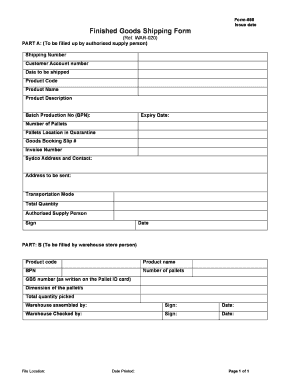
Get Blank Shipping Tender Form
How it works
-

Open form follow the instructions
-

Easily sign the form with your finger
-

Send filled & signed form or save
How to fill out the Blank Shipping Tender Form online
Completing the Blank Shipping Tender Form online can simplify the shipping process and ensure accurate documentation. This guide provides a clear and structured approach to filling out each section of the form efficiently.
Follow the steps to complete the Blank Shipping Tender Form accurately.
- Click ‘Get Form’ button to obtain the form and open it in the editor.
- In Part A, begin by entering the shipping number assigned to your shipment.
- Input the customer account number associated with the order.
- Specify the date when the shipment is scheduled to be sent.
- Fill in the product code that corresponds to the items being shipped.
- Provide the product name for each item included in the shipment.
- Detail the product description, offering enough information for identification.
- Enter the batch production number (BPN) for the goods being dispatched.
- State the expiry date of the products, ensuring compliance with shipping regulations.
- Indicate the number of pallets included in this shipment.
- List the pallets' location in quarantine if applicable.
- Record the goods booking slip number to track the shipment.
- Input the invoice number to reference the transaction.
- Fill in the Sydco address and contact details for the shipment.
- Provide the address where the goods will be sent.
- Specify the transportation mode that will be used for delivery.
- Enter the total quantity of products being shipped.
- Designate the name of the authorised supply person completing the form.
- Sign and date the form to confirm that the information is accurate.
- In Part B, the warehouse store person should fill in the product code, product name, and BPN again.
- List the number of pallets in this part of the form.
- Record the GBS number as specified on the Pallet ID card.
- Enter the dimensions of the pallets included in the shipment.
- Document the total quantity picked for shipping.
- The warehouse assembled person should sign and date this section.
- Finally, the warehouse checked by person should also sign and date the form.
- Note the file location for future reference.
- Ensure to print the form or save changes, download, and share as needed.
Start filling out your Blank Shipping Tender Form online today!
Related links form
AFFIDAVIT IN LIEU OF FORM 546 - Nevada Real Estate Division - Red State Nv
Us EXPERIENCE VERIFICATION FOR A NEVADA REAL ESTATE LICENSE FORM MUST BE COMPLETED BY VERIFYING
STATE OF NEVADA DEPARTMENT OF BUSINESS AND INDUSTRY REAL ESTATE DIVISION MAILING LIST (CD ROSTER)
649 - Nevada Real Estate Division - Red State Nv