Loading
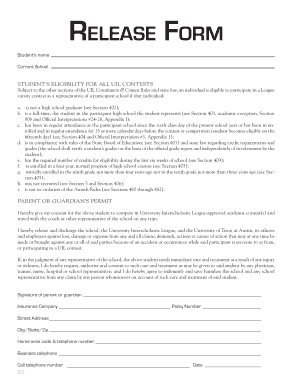
Get Release Form - Teacher
How it works
-

Open form follow the instructions
-

Easily sign the form with your finger
-

Send filled & signed form or save
How to fill out the RELEASE FORM - Teacher online
Filling out the RELEASE FORM - Teacher is an important step in ensuring a student's eligibility for participation in UIL contests. This guide will provide you with comprehensive, step-by-step instructions to help you successfully complete the form online.
Follow the steps to fill out the form accurately and efficiently.
- Press the ‘Get Form’ button to obtain the RELEASE FORM - Teacher and open it in your online editor.
- In the first field, enter the student's name. Ensure that the name matches the one registered with the school.
- Next, input the current school where the student is enrolled. This should be the official name of the institution.
- Review the eligibility criteria outlined in the form. Confirm that the student meets these criteria, which include conditions related to school attendance, grades, and compliance with UIL rules.
- In the parent or guardian's permit section, provide your consent for the student to compete in UIL-approved contests and participate in related travel. This may require a signature if necessary.
- Fill in the insurance company name and policy number in the respective fields. This information ensures access to medical care if needed during contests.
- Complete the address section, including street address, city, state, and zip code. Accuracy in this information is essential for all correspondence.
- Enter the home area code and telephone number. Make sure this number is current so that you can be reached if necessary.
- Provide your business telephone number and cell telephone number. These will be used for emergency contact if needed.
- Finally, enter the date of completion at the bottom of the form. Review all fields to ensure that all information is correct and complete.
- After verifying all entries, you can save your changes, download the form, print it, or share it as required.
Complete the RELEASE FORM - Teacher online today to ensure your student's eligibility for UIL contests.
Most Important Terms in a Release Form Names of releasor and releasee. Details about the project being produced. Information about what permissions are granted. Special considerations, such as crediting requirements or payment obligations.