Loading
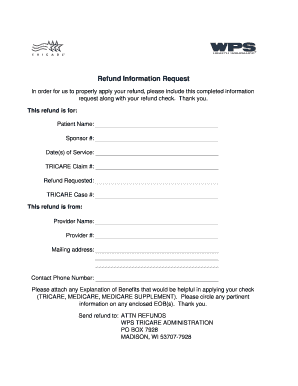
Get Refund Information Request - Tricare4u.com
How it works
-

Open form follow the instructions
-

Easily sign the form with your finger
-

Send filled & signed form or save
How to fill out the Refund Information Request - TRICARE4u.com online
Filling out the Refund Information Request is an essential step to ensure your refund is processed accurately. This guide provides clear, step-by-step instructions to assist users in completing the online form with ease.
Follow the steps to complete your refund information request.
- Click ‘Get Form’ button to retrieve the Refund Information Request form and open it in the online editor.
- In the section titled 'This refund is for,' fill in the 'Patient Name' field with the name of the patient for whom the refund is being requested.
- Enter the 'Sponsor #' in the designated field; this number is typically associated with the Primary Beneficiary of TRICARE services.
- Provide the 'Date(s) of Service' by listing the specific dates during which the medical services related to the refund were provided.
- Input the 'TRICARE Claim #' associated with the claim for which you are requesting a refund.
- Specify the amount of the refund being requested in the 'Refund Requested' field, indicating the total desired reimbursement.
- Fill in the 'TRICARE Case #' if applicable; this number relates to any ongoing case or issue you may have with TRICARE.
- In the 'This refund is from' section, include the 'Provider Name' and 'Provider #' that corresponds to the service provider from whom the refund is being requested.
- Provide the 'Mailing address' of the service provider to ensure that any correspondence reaches them directly.
- Enter your 'Contact Phone Number' for any follow-up questions or clarifications regarding your refund application.
- If you have any Explanation of Benefits (EOBs) that could assist in processing the refund, please attach them to the request. Circle any relevant information on the enclosed EOBs.
- Finally, review all entries for accuracy before submitting. Save your changes, then choose to download, print, or share the completed form as needed.
Complete your refund information request online today to ensure timely processing of your refund.
TRICARE is managed by the Defense Health Agency under leadership of the Assistant Secretary of Defense (Health Affairs).