Loading
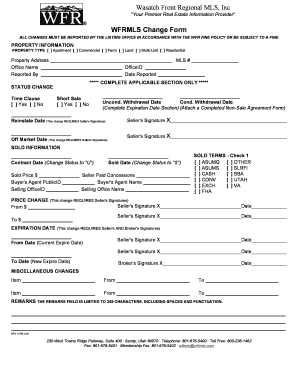
Get Mls Policy Information & Updates - Utah Real Estate
How it works
-

Open form follow the instructions
-

Easily sign the form with your finger
-

Send filled & signed form or save
How to fill out the MLS Policy Information & Updates - Utah Real Estate online
Filling out the MLS Policy Information & Updates form online is a crucial step for users in reporting changes to property listings. This guide will provide clear instructions for successfully navigating the form and ensuring compliance with the required policies.
Follow the steps to complete the MLS policy information and updates form correctly.
- Click ‘Get Form’ button to obtain the form and open it in the editor.
- Begin by filling out the property information section. Select the appropriate property type from the options provided, such as apartment, commercial, or residential. Next, enter the complete property address, your office name, and the individual reported by.
- Fill in the MLS number and Office ID, along with the date the changes are reported. Make sure to complete only the applicable sections relevant to the changes you are making.
- If there is a status change, indicate whether there is a time clause and whether it involves a short sale. Provide the necessary dates for unconditional and conditional withdrawals, and make sure to include seller signatures where required.
- For sold information, enter the contract date, sold price, and relevant agent details. Specify sold dates and any seller concessions that have been agreed upon.
- In the sold terms section, check one of the options provided to indicate the financing type.
- If you need to report a price change, remember that seller signatures are required. Clearly specify the new price, alongside any necessary signatures and dates.
- For marking expiration dates, both seller and broker signatures are required. State the current expiration date and the new expiration date with respective signatures.
- Address any miscellaneous changes as needed, providing clear details for each item modified. Lastly, complete the remarks section, adhering to the character limit.
- Review all entries carefully. Save changes, and proceed to download, print, or share the form for submission.
Complete your documentation online now to ensure compliance and timely updates.
Multiple Listing Service (MLS): What Is It.
Industry-leading security and compliance
US Legal Forms protects your data by complying with industry-specific security standards.
-
In businnes since 199725+ years providing professional legal documents.
-
Accredited businessGuarantees that a business meets BBB accreditation standards in the US and Canada.
-
Secured by BraintreeValidated Level 1 PCI DSS compliant payment gateway that accepts most major credit and debit card brands from across the globe.